All posts by dnas2

SOTA Equipment demo at Suffolk RED

I was invited to Suffolk RED last evening for the opportunity to demonstrate the sort of equipment I take up hills for SOTA purposes.

For those who don’t know, Suffolk RED (Radio and Electronics Development) is a monthly supra-club event, now into its fourth year, which has proved very popular in East Anglia. The premise is simple: rather than a boring talk in a local radio club, once a month people with something to show can take a table, lay out their goods, and people just mill around, talking, and looking at what is on the tables. Visitors come from a range of local radio clubs. It’s a great opportunity to talk and discover new aspects of our fascinating hobby.

And that’s where my table fitted in. I was next to Rob M0VFC, who was showing off the lightweight kit he had taken to Norfolk Island a couple months ago, while my set of gear was slightly different (no Juma amp and more navigation aids!). It should be noted that my equipment list isn’t particularly special, nor is it perfectly weight optimised (I still use RG-8 Mini coax instead of RG-174, for example). The event was a great starting place for introducing some people to SOTA, however.

So here’s what I took:

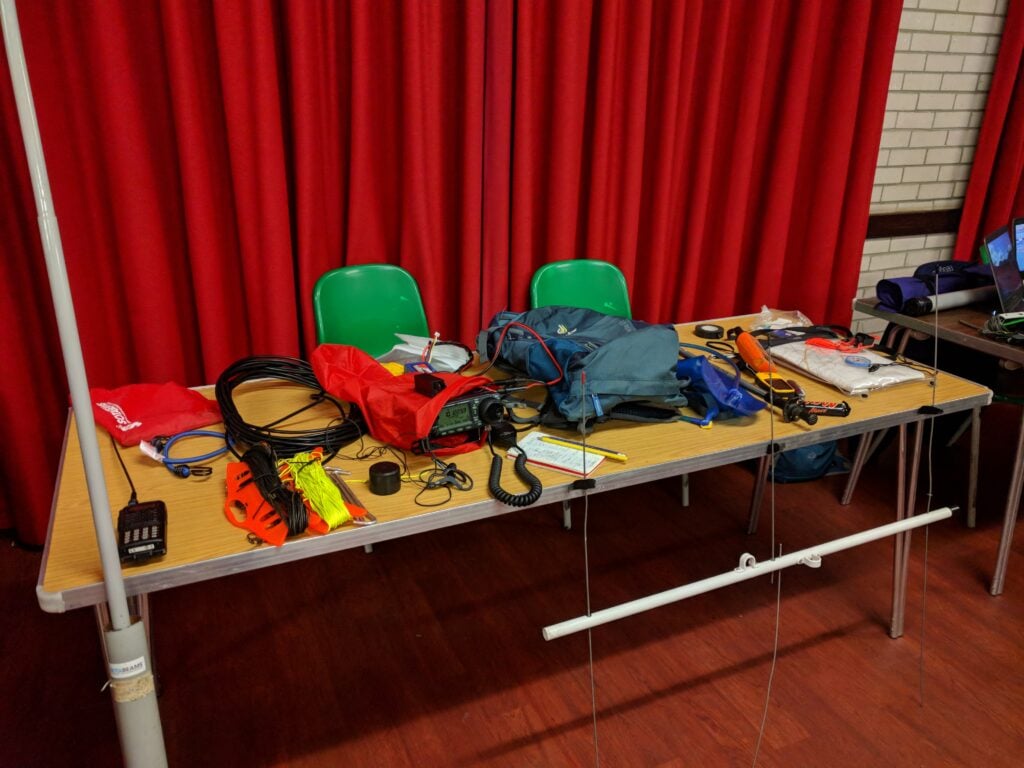
SOTA gear on the table at Suffolk RED

From left-to-right:

The radio equipment:

  • 10m DX-Wire fibreglass pole
  • FT-60 handheld
  • Bungee (useful for attaching the fibreglass pole to trig points, fences, etc.)
  • 30m dipole on kite winder
  • SOTA Beams guying kit with high visibility cord on kite winder
  • RG-8 Mini coax
  • Tent pegs
  • IC-706Mk2G with sports headphones (which don’t fall out in the wind) in a waterproof bag
  • Palm Paddle CW key
  • 4.2Ah 4 cell LiFePo4 battery (14.4V fully charged)
  • Waterproof notebook with pencils for logging
  • Insulating tape
  • SOTABeams 3 element 2m yagi

The walking equipment (because we always need suitable equipment in the hills, and that isn’t just radio gear):

  • 3l water bladder
  • Hiking pole
  • Mars bar (emergency sugar)
  • Garmin InReach Iridium satellite beacon
  • Garmin eTrex e10 GPS
  • First aid kit
  • Whistle
  • Map
  • Compass

The whole set packs down to 6.3kg (excluding any water) and fits in the rucksack in the middle of the table.


A non-serious entry in REF-CW 2018

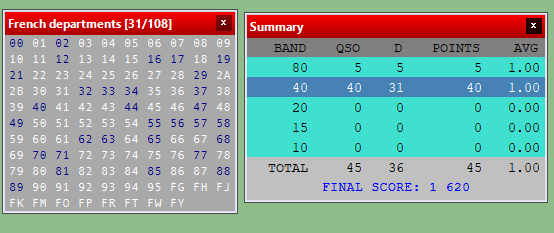
I had a bit of spare time over the weekend, so gave away a few points in the French REF-CW contest.

Equipment was my Elecraft K3 with just 40W out (to prevent QRM to neighbours) to my 30m dipole, tuned onto 40m. I’m not entirely sure how effective this was. Many stations seemed to struggle with my callsign, so I suspect I wasn’t very strong to them. Having said that, conditions on 40m did also seem genuinely rubbish with deep QSB. On a number of occasions, someone who was S9 when CQing was S0 and unreadable by the time they were giving my report – very frustrating!

I did try 5 QSOs on 80m but it was clear I was very weak there and everyone was struggling to copy me. That wasn’t a surprise, as my 30m dipole required several attempts by the K3s ATU to make it semi-happy, so I quickly abandoned.

REF CW 2018 scores and mults screenshot

My log will be published automatically on 1st February.

RSGB 80/40 Affiliated Societies Contests 2018 – G3PYE

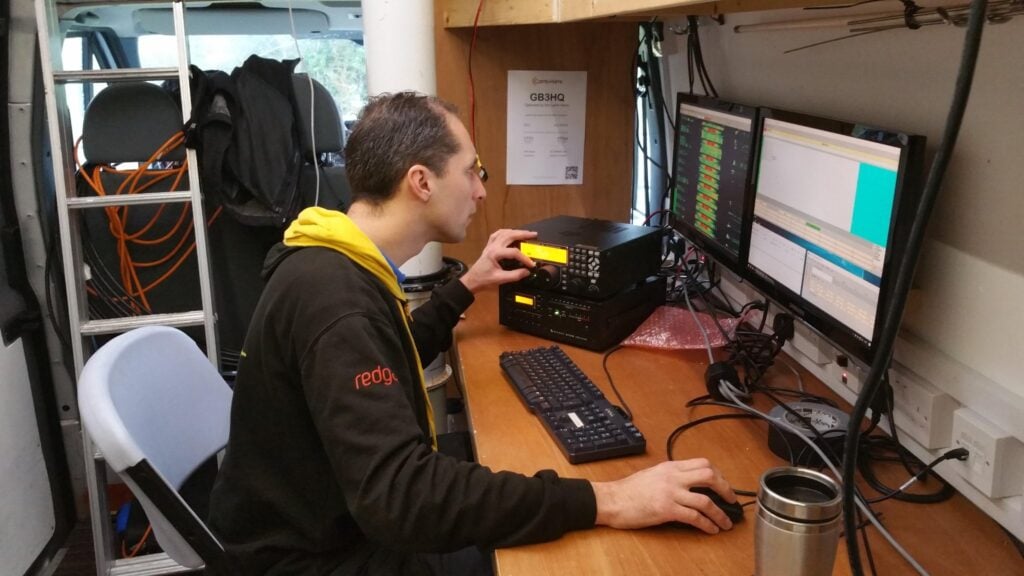
I operated with Rob M0VFC for the three RSGB 80m and 40m Affiliated Society Contests in January 2018 from Flossie, the Camb-Hams van, at our Worts Causeway site (JO02CE).

CW (Sunday 7th January)

This was a very fun event. We were using two Elecraft K3s, one with a KPA500, and the other with a Juma amplifier, to dipoles. The 80m dipole was at the top of Flossie’s mast, and the 40m was parallel with the centre about halfway up the mast. Despite this, there were no discernible interactions between the antennas.

We were about 20 minutes late on, just by virtue of having been late on-site, but we were still able to take advantage of about 40 minutes good inter-UK propagation on 40m before changing to 80m.

Once we were underway properly running on 80m, we then started interleaving S&P QSOs on 40m, using a simple interlock cable on the K3s to keep us abiding by the rule only to transmit on one band at a time. (The running station was master, and could transmit at any time; the S&P station was slave, and could only transmit when the master was not in transmit).   It did take us a little while to get used to watching each other to avoid transmissions being interrupted by the interlock, but it netted us a nice few GMs and EU stations while allowing the 80m station to keep the run frequency.

Thanks to M0PCB’s fantastically quick adjudication, we now know that we came joint 28th overall, with 230 points. This put our entry into the Camb-Hams B team, which came 7th overall (with Camb-Hams A coming first).

We had double the average amount of errors for the contest in our UBN, so that’s something to work on for next year!

SSB (Saturday 13th January)

We were late on again for SSB – this time due to multiple failures of the 80m dipole – which meant that we missed the fact that lots of people gave up on 40m early because of conditions and the QRM from the Italian contest. This, in turn, meant that we were late getting down to 80m.

Once we were running, though, we got some good rates. We again interlocked the two K3s, and this was much easier on SSB as we could hear what each other were doing, of course. At times, it was even slow enough for us to operate 2O2R3V (two operators, two radios, three VFOs!) as the running operator could S&P on the B VFO in-band, as well as CQing!

We got a score of 228 points, giving us 22nd place overall. This again put us in Camb-Hams B team, which came fourth overall. Again, we were pleased that Camb-Hams A were first.

Data (Saturday 20th January)

Rob M0VFC on the RTTY data station

The inclusion of datamodes in AFS this year is new, and it gave us our first experience of a datamodes contest. I’d only briefly dabbled before, and Rob had never touched RTTY or PSK.

Despite another failure of the 80m dipole, we were set up on time. The start was very slow, however, and for a while we thought something was wrong. However much we called on 40m, nobody came back to us. Some S&P proved that there was nothing amiss, though, and returning to running, everything suddenly came to life.

This time we didn’t operate with two radios: we weren’t experienced enough for that. We did however use the second K3 to monitor our transmitted signal with no antenna connected, thus giving us confidence that we were ‘clean’.

At time of writing, we haven’t got adjudicated results yet, but our claimed score is 171. This looks to be a pretty good score. Most interesting is that the highest scores in both the 100W and 400W categories look very similar, and the fact that 172 is much less than the ~230 points we got in the other two legs. This seems to confirm our suspicion at the time that the contest was activity limited, rather than limited by conditions or equipment. If so, that could do very interesting things to the wider AFS Superleague results.

Update: The results are now out and, amazingly for our first data contest, we got a completely faultless log. As such, we placed in the Camb-Hams ‘A’ team, which came second to Norfolk ARC ‘A’.

Amateur Radio Logging in the Cloud (Part 1)

This post describes a project I’ve been working on during Christmas this year. It is a project that’s absolutely not for the inexperienced, so if you decide to take any of the ideas in this post – which you’re absolutely welcome to do – I won’t be able to assist.

This is Part 1 of the post. Part 2 hasn’t been published yet (I’ll edit that when I get around to part 2). The scripts referred to here and all the other code will be made available on GitHub when Part 2 is published.

The problems:

Ubiquity or Functionality?

There are loads of amateur radio logging programs out there, and over the years I’ve tried many of them. Most suffer from a common problem, however: because our radio equipment is increasingly used under computer control, we opt to keep our logs on our shack computer, which can have soundcards and serial ports connected to the radios.That understandable quest for functionality in the logging software has a disadvantage, however: if we operate a portable station at different locations, we either have to take our logging computer with us, or else go through some routine of remembering to import and consolidate the logs in a single place later.

Other logging programs, such as 2M0SQL’s Cloudlog, take the alternative approach of being an online, hosted log. You can enter your contacts from anywhere, but that comes at the cost of not being able to connect the logging computer to your radio – for sound security reasons, web browsers can’t access serial interfaces connected to your computer.

Today, there are hacks which try to resolve this disadvantage. M0VFC’s CloudlogCAT program, for example, essentially gives Cloudlog some ability to talk to the radio by proxying commands through a local client computer. In the future, WebUSB should allow web browsers to talk to connected devices in a secure manner, but that will require new chips in our radios, and I can’t see the manufacturers adding support any time soon.

Backups and security

Having our logs stored on a local logging machine has a substantial disadvantage: we are responsible for our own backups and keeping our logs safe. We know this isn’t happening. All too often, we hear of people who have lost their logs in a hard-drive or virus incident, with the resulting impact on other people who need those log records. One of the advantages of a system hosted online, by someone else, is that they can maintain backups.

And other problems…

I’ve ranted before about how I don’t believe amateur radio log programs generally don’t have the right data model: when I go on a DXpedition somewhere, even just making a handful of contacts from a SOTA summit, those QSOs should be grouped together in my log as they share common information like locator square, IOTA/SOTA reference, etc. This means we need the concept of ‘activation’ in the log, as a parent of the child QSOs. This becomes especially critical if I’m uploading the QSOs to Logbook of the World, for example, as I want all the QSOs to be signed with the right grid square, which may not apply to the rest of the QSOs in the log. I’m amazed that too many logs still haven’t got this concept right. As we increasingly rely on automatic methods for uploading and signing QSO information and then claiming awards, there’s massive scope for errors if people are just signing data with a default certificate configuration because that’s all their program allows.

Enter Log4OM

I like to try different logging programs on a regular basis as its a fast-moving field in terms of functionality. About a year ago, I re-discovered Log4OM and decided to stick with it. Whilst it isn’t perfect (it doesn’t support the concept of activation described above, for example, and being desktop software it doesn’t allow ubiquitous logging), it has most of the features I require and good QSL management tools – critical for me as I deal with a lot of DXpedition QSOs each year.

At a technical level, Log4OM runs using a SQLite database by default – a sensible choice as it allows for easy first-time installation that ‘just works’. For those of us who know what we are doing, however, we can opt to switch to a MySQL database instead. MySQL is a database server program that’s designed to be used in a client/server architecture and is a very mature product – it is behind a lot of the world’s websites.

For the last year, I’ve been using a local MySQL server with my Log4OM installation (thereby continuing to sit on the ‘functionality’ side of the ‘functionality/ubiquity balance’ I described above. Then it occurred to me a couple months ago that there was no need to do this…

To the cloud! (AWS EC2, to be precise)

As I said, MySQL is designed for use in a server/client architecture, so just running the database locally on my computer means I wasn’t taking full advantage of its abilities. A few weeks ago, I spun up a T2-Nano Ubuntu Linux machine in AWS EC2, part of Amazon’s cloud-computing infrastructure, and installed MySQL on it. It was then just a matter of uploading the data from my local MySQL server to the one in EC2 and then changing the Log4OM profile for each of my logs to reflect the new login details.  Since Log4OM doesn’t support MySQL connections over SSH, I also created a different user with restricted permissions and a non-default password that I’d use for logging in from Log4OM, and removed the default users that are created by Log4OM when new databases are created.

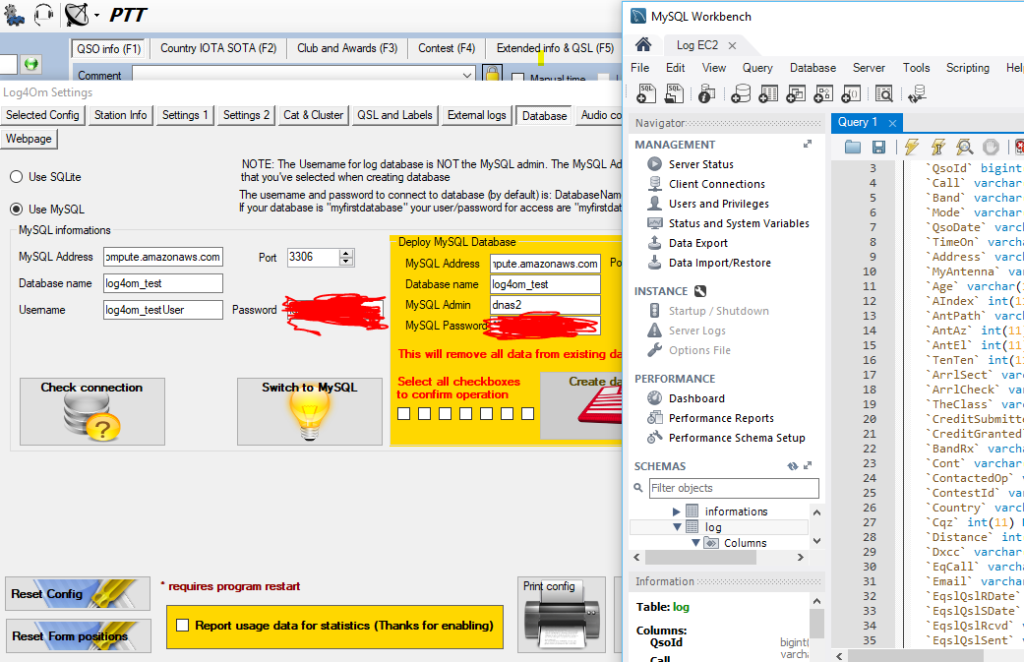
Testing connection to EC2 from Log4OM settings

Sure enough, I was soon connected to the database in the cloud from Log4OM:

Connected

(For the benefit of anyone else trying this, I also found a bug in Log4OM’s MySQL support, and an associated workaround, in the course of moving to a new MySQL installation.)

To summarise where we’re up to before I go any further:

  • I’ve now got Log4OM on my local desktop computer, acting as desktop software with CAT and soundcard connections to my K3, but using a database hosted by Amazon.

    This resolves the ubiquity / functionality conundrum: I have full functionality from my logging software but the flexibility to connect to a single, always-on, database from any computer anywhere with an internet connection, as log as it has Log4OM installed.

A note about performance

Connecting Log4OM to a hosted database in the cloud doesn’t come at nil performance cost. Everything, particularly some of the batch operations such as marking several QSLs as sent, takes a few more seconds than you’ll be used to on a local server. As you might expect, this is worst with very large logs (tens of thousands of QSOs), but I haven’t found it to be so annoying that this slowdown would outweight the other benefits.

Handling backups

As I mentioned, one of my concerns was backups and data security: I wanted to not have to bother about such issues in a hosted world. Had I gone for a database on the AWS RDS product, this would indeed have been handled by Amazon for me, but because I had gone for EC2 (for both cost and extensibility reasons), I would have to handle backups.

In a sense backups are even more critical on EC2 than on home computers, as EC2 storage is ephemeral: if the server is switched off all its data is lost and has to be recreated.

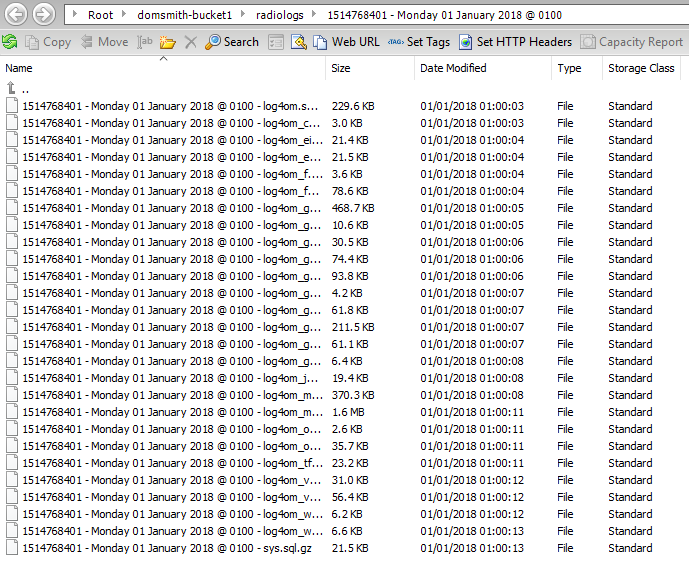
The first stage was to write a script to ship gzip’d copies of all the MySQL database tables to an S3 bucket every month. I also then wrote a script to store weekly incremental ADIFs of contacts since the start of the month, which is then emailed to me from the server. This means that a maximum data loss I should be exposed to at any time is 7 days (although Log4OM is set to upload all QSOs immediately to Clublog, so I could even recover the last 7 days if I needed to).

Backups stored in an S3 bucket

Contest logs

For reasons that will become clear in Part 2 of this post, I also wanted to make ADIF backups of my various contest logs available separately, as I’m a great believer in making contest logs public for transparency. Having installed lighttpd as a web server on the EC2 instance alongside the MySQL database, a script checks for any contest entries the previous weekend each Monday and creates ADIFs for each contest. These are then exposed over HTTP (but not necessarily published on a website). There’ll be more on this in Part 2!

As with all the other scheduled scripts that I mention in this post, I’ve also got a ‘rebuild’ version of the script for restoring old data when I lose the ephemeral storage.

With that, we have two of the three problems resolved: I have a good balance between ubiquity and functionality, and backups are being handled. Now onto the third…

SOTA Logger

One of the use-cases where I find Log4OM to be weaker is logging SOTA activations. Whilst it’s great that it supports SOTA at all – many logging programs don’t – entering QSOs in the Log4OM UI is a bit complex. This is because the SOTA reference has to be entered on another tab and, while the database schema allows for different values for the ‘MyGridReference’ field per QSO, there’s nowhere in the UI to enter your grid reference other than the default for the station.

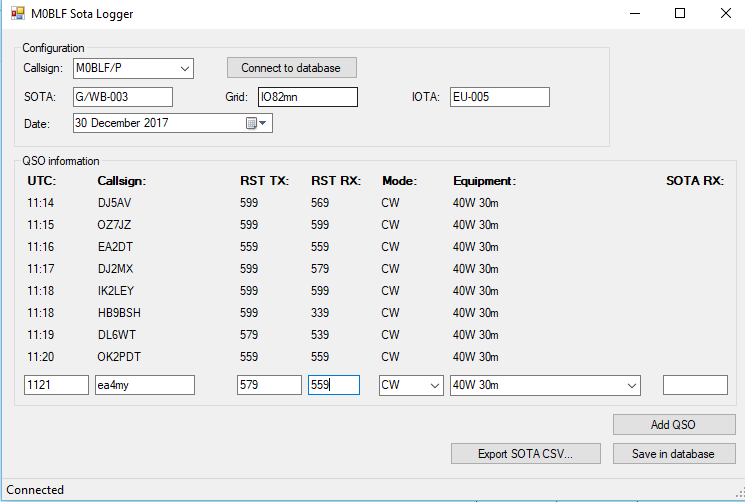
Since my database is in the cloud, it is now divorced from Log4OM itself. This means that, as long as I don’t alter the schema (the database structure) in a way that is incompatible with Log4OM, I don’t have to use Log4OM for logging,  Anything that gets into the database by whatever means will be picked up by Log4OM. My solution to the SOTA problem was therefore to write a program called SOTA-Log4OM. This does what it suggests: it’s a very simple program for logging SOTA activations that connects to the Log4OM database and enters the QSOs with the correct information, including grid reference, etc. It also creates an activation CSV for upload to the SOTA website.

SOTA Logger

Each week on a Tuesday (to give me time to type up a log from a weekend activation), ADIF records for each SOTA activation in the previous week are created (if there are any), and exposed for download over HTTP… again, the reasons for this will become clear in Part 2 of this post!

Again, I’ll take a break to summarise my progress:

  • We have the MySQL database for Log4OM running in the cloud, as an always-on instance that can be connected to from anywhere
  • This allows us to keep the functionality advantages of having desktop logging software with CAT control and soundcard connected to the radio, whilst letting us log from anywhere without having to merge logs or synchronise databases
  • We are backing up the logs monthly to S3, with weekly incremental backups over email
  • Contest logs are also created separately and exposed over HTTP
  • For logging SOTA activations, we have our own simple UI that logs QSOs into the same MySQL database as used by Log4OM
  • Those SOTA logs are then exposed for download over HTTP

Signing LOTW records correctly

As described in the introduction, I have a problem with logging software that automatically signs QSOs for LoTW in that there is often no separation of QSOs by activation. When you sign a LoTW upload, you are signing with a ‘Station Location’, which is a combination of DXCC, Gridsquare and IOTA (if applicable). I rarely see logging software create new ‘Station Location’ records for different QSOs in the same log, however – Log4OM certainly doesn’t. This lack of support has stopped me from regular LoTW uploads in recent months, especially given the number of SOTA activations I’ve done with a handful of QSOs from each different QTH. I don’t want to be creating new ‘Station Locations’ myself for each QTH.

I do have all that information in my logs, though, so I can deal with this now that I have a database server where I can run scripts. On a monthly basis, for each QSO, I create a ‘placehash’: an MD5 hash of the results of concatenating my callsign with all the information needed for a ‘Station Location’ in a particular way. On a monthly basis, a zip file of ADIF files containing the previous month’s QSOs separated out by placehash is exposed at the server’s HTTP port, ready for download.

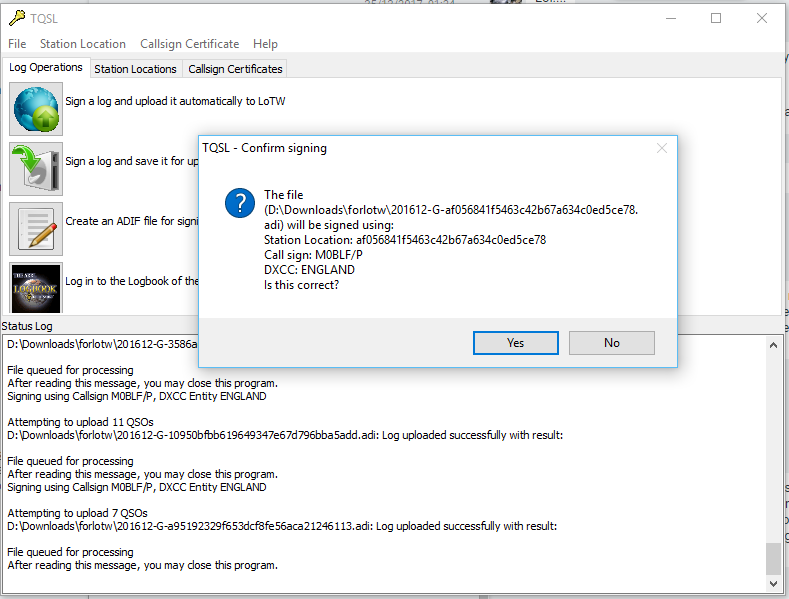
Also created monthly is a station_data file. The TrustedQSL software uses a station_data file (which is actually XML) to define the Station Locations. All I need to do is to overwrite the station_data file stored in the user’s Roaming profile in a Windows installation of TrustedQSL with the one created by the logging server, and TrustedQSL will ‘know’ about all the different station locations I have visited.

I just then need to sign the log (containing the placehash in the filename) with the Station Location for the same placehash and I can be sure that all my LoTW records are signed correctly.

Signing a LoTW record by placehash

Ideally I’d like to automate this process on the server. Although it looks like this would be possible with the tqsl command line in the Linux version, I haven’t yet found a way to install TrustedQSL without the 320MB of (mainly graphics-related) dependencies, which I’d like to avoid given that it’s being stored on an ephemeral system.

Clublog OQRS merging

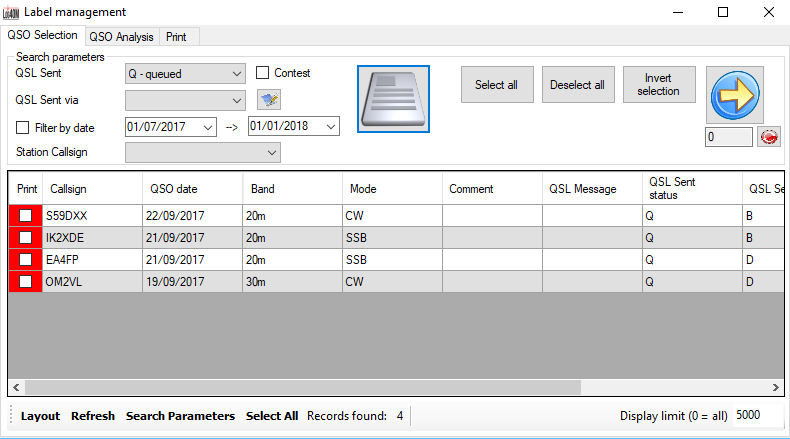
Is there anything else I can solve while I’m at it? As I said, one of my biggest time-sinks is handling QSL cards for DXpeditions I’ve been on. OQRS – the ability to request a QSL card online, with postage covered over Paypal – has certainly sped up the process a lot but there’s still a manual step: each time I do cards I have to log into Clublog, download an ADIF containing the QSL requests, and merge it into the Log4OM log, so that the Print Labels option in Log4OM prints requested QSL cards.

So, I wrote a script to live on the database server to download any OQRS files from Clublog on a weekly basis, and do the merge for me. This means I just need to press the Print button in Log4OM and requested card labels emerge without me doing anything else.

QSL labels ready to print

Another script also creates an ADIF file of sent QSLs each month and exposes them over HTTP. Again, see part 2 to understand why!

As you can probably tell, this is all part of a much bigger project. I’m really keen to hear feedback on where I’ve got to so far, and hopefully I’ll be able to publish Part 2 soon. There’s a lot more to come!

SOTA trip to the West Pyrenees

In August 2017, I spent a few days doing some of the Summits on the Air summits in the Pyrenees.

Monday 31st July

Trône du Roi (F/PO-187): Attempt 1

After flying into Toulouse and getting a hire car (which took an unexpectedly long time), I drove to the Trône du Roi (King’s Throne) to operate, again this took a longer time than I expected. From what I’d read before leaving, Trône du Roi is a relatively easy two points, and wasn’t far from my hotel, making it an ideal option for a late afternoon activation before checking-in.

I made a basic error, however. In my haste to get through the airport and on the road as quickly as possible, I’d forgotten to pick up water. When I got to the hill, therefore, I not only found myself lacking hydration on a relatively warm afternoon, but I also realised it was rather later in the day than I had expected. I got to the 1000m elevation point (about a third of the way up) and then decided to head back down. I’d at least stretched my legs before tomorrow.

Tuesday 1st August

Pic d’Estremère (F/PO-129)

Today started with a reasonably early start, as I wanted to do two big (8 point) mountains on the Spanish border, and my hotel was already 1.5 hours away from where I’d need to park at the Col du Portalet.

Getting there was no problem and I was soon on my way up the Pic d’Estremère. On the face of it, this is another fairly easy option. It’s right next to the car park at the former customs post and – on the map at least – there are some obvious paths to the top. The reality was that it was rather steeper in places than I had expected, and certainly one that needs hiking poles. The bigger problem was that the paths were less easy to find than I had expected, other than the big GR10 cross-Pyrenees route, which doesn’t actually go to the summit. On my ascent, I made the mistake of not staying on GR10 for quite long enough and ending up on a particularly steep face instead, from which I had to make a quick retreat. Nevertheless, I eventually picked my way to the top and, once there it’s a lovely operating site. There’s lots of space within the activation zone and there was nobody else on the mountain at all. I was quickly into a decent pileup and, despite the odd problem with the antenna falling over, it was a very pleasant activation. As with all my contacts during this trip, I was exclusively on 30m CW.

Loading map…
Distance
—
Elevation gain
—
Elevation loss
—
Max elevation
—
Waypoints
—
Elevation profile

Soum de Grum (F/PO-149)

After returning to my car for lunch, my plan had been to tackle the Pic d’Anéou, just on the other side of the road from the Portalet, another 8 point mountain. By now, it was getting quite warm, however, and I had also read that there’s a tricky section requiring poles near the summit… and one of my poles had broken on my way up Estremère! As a result, I decided to switch to my Plan B: the Soum de Grum. This is about a one hour drive from the Portalet, enough time to crank up the air conditioning and cool down before starting another ascent.

The main website I used to research routes, Topopyrenees.com, describes (in French) the Soum de Grum as being a nice easy walk, suitable for children, up decent paths from the car park at the Col d’Aubisque. If that name sounds familiar, the car park has been the site of many iconic Tour de France mountain-top stage finishes.

The website wasn’t wrong at all. However, as I’d been driving, clouds had started to form and, by the time I was on the Aubisque, visibility was almost nothing. Despite this, I had no problem at all with following the path and finding my way to the summit of the Soum de Grum very quickly. The path isn’t particularly steep at any points, and you don’t need to use hands. It is also perfectly possible to do without poles.

Once there, there was relatively little space on a bit of a ledge, although this may have partially been by sensation as I couldn’t see where the sides of the mountain were in the fog, and so I was playing it a bit safe. Consequently, I found myself operating with the dipole almost lying along the ground, but it still wasn’t a problem to get the required four QSOs and make my way down. In fact the most challenging part of the activation was still to come: driving down hairpin bends with steep drops if you misjudge them, in an unfamiliar car in limited visibility is rather more difficult than walking along a clear path!

(Note: I got the summit reference incorrect in this tweet: F/PO-149 is correct)

Wednesday 2nd August

My original plan for the day had been to climb Pic Lasnères (F/PO-138) and Mardas (F/PO-126) in a loop, following a combination of the routes described at Pic Lasnères and Randonée Lac du Montagnon. Mardas would have been a first activation and looks pretty do-able (although note what the description says about needing poles on the way down).

These mountains are reached from the village of Adyius and following a path over 6.5km to the parking place. When I got to Adyius, however, the road was blocked both by preparations for a local fête taking place that day and a more permanent sign indicating no entry except to residents. In my hire car, I wasn’t prepared to take the risk of going down a track I wasn’t supposed to be on.

Luckily, the Trône du Roi, which I’d failed to activate on Monday, wasn’t too far away, so I turned around and went there instead.

Trône du Roi (F/PO-187): Attempt 2

The Trône du Roi is reached along about 3km of slightly rutted, gravel (not tarmac) track. It’s not bad, however, and I didn’t feel concerned about doing in the car.

This time I had plenty of water and, at this point in the morning, plenty of time. As I climbed, the temperature became steadily hotter and by the time i reached the summit it was in the high 20s Celcius. I was actually rather glad that I hadn’t been able to get to Lasnères and Mardas, as in such heat I think the loop might have been a bit difficult.

The path up the Trône du Roi was initially under trees and some of the stones were a little slippery in the morning dew. Once out of the trees (and under the heat of the sun), the path climbs steeply and fairly unrelentingly for its whole length. I never felt in danger but there are places where it’s fairly close to the edge of the mountain, so you definitely need to watch where you are going, both on the ascent and descent.

The summit itself was much more uncomfortable. This is another fairly narrow summit with steep drops off the side, it was fairly busy with people, covered in sheep droppings and with swarms of flies everywhere. You can even see some of the flies in the tweet below.

In addition to the lack of space, I felt an inexplicable amount of vertigo up here (probably brought on by the heat and disorientation caused by the flies, which were crawling all over my face, in my mouth and even getting stuck in the CW paddle!). Trying to guy my SOTA pole would probably have resulted in it falling off the mountain even if I could keep it away from other people, so I literally lied the dipole legs along the grass and hoped the elevation would do the rest. It did, and as soon as I had four QSOs, I was off the summit as quickly as possible.

Loading map…
Distance
—
Elevation gain
—
Elevation loss
—
Max elevation
—
Waypoints
—
Elevation profile

Issarbe (F/PO-171)

By now, I was feeling pretty tired in the heat of the day, so I opted to drive a bit further to bask in the air conditioning(!), heading to Issarbe. Before coming to France I’d not only come up with my Plan A list of targets, but also a list of other options. From that research, I knew that Issarbe should be potentially one of the easiest 4-point options in the Pyrenees chain. Issarbe is a ski resort, and so has a decent road leading nearly to the summit. In summer, reaching the summit is just a matter of a short walk up the ski runs and then a couple of decent paths to get you into the activation zone. That’s exactly what this mountain proved to be like, and I had a wonderful short activation making a lot of contacts. There’s plenty of space for putting a dipole out here.

Over the course of the 20 minutes or so that I was operating, I gradually became aware of a cool wind starting to blow up and shadows becoming weaker. Looking up at one point, I realised that a repeat of yesterday was underway – cloud was forming in the valleys and starting to convect up the side of the mountains. There was a risk that we could plunge into near-zero visibility once again and, although I was happy enough at my ability to follow a ski run back to the car, I didn’t really want to do another drive down a mountain in such conditions. As a result, I had to stop while people were still calling (something I try not to do) and quickly pack up.

A few minutes after the photo below was taken, you couldn’t see the ski station buildings from the summit.

Loading map…
Distance
—
Elevation gain
—
Elevation loss
—
Max elevation
—
Waypoints
—
Elevation profile

Friday 4th August

Miramont (F/PO-238)

After a rest day on the beach, my original plan had been to return to Toulouse via Pic de Cau (F/PO-260), a nice-looking 2-point hill just off the motorway. Unfortunately, I’d been unable to to find any details as to how long the walk was likely to take, where best to park, etc. After the issues I’d had at the airport on my way into France, and with some stories in the press about extra time being needed for passport controls in France, I didn’t want to take the risk of being late, so instead I decided to go to another of my Plan B options: Miramont.

Although only one-point for SOTA, it’s a nice easy one. Just off the main road from Tarbes to the pilgrimage site at Lourdes, drive into the village of Julos and walk up a track to a mobile phone base-station site. That’s really all there is to it. I set up the station just outside the transmitter compound (still easily within the Activation Zone) and within just a few minutes had a nice small pile-up.

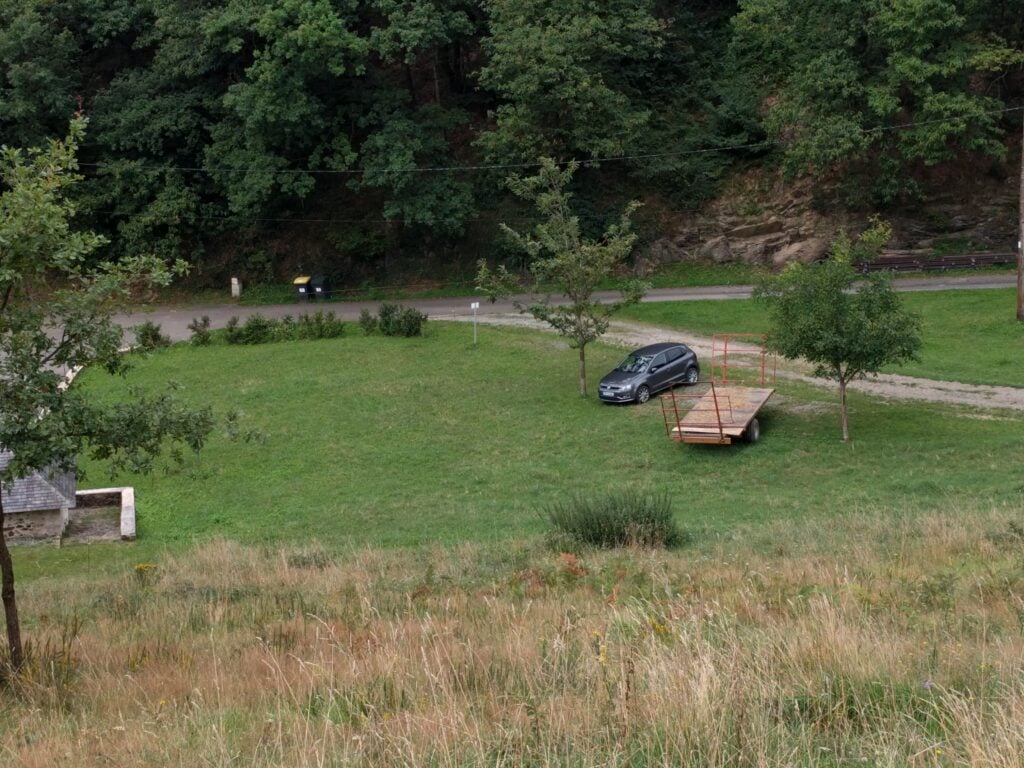
Just for reference, speaking to a local tractor-driver, the ‘approved’ parking place in Julos is on the gravel area between the two trees in the photo below (where my hire car is), right at the start of the track up Miramont.

Overall, this was a wonderful trip. Although I didn’t get to everywhere I’d originally planned, I had a very pleasant time in the mountains and bagged 35 SOTA points in three days.


Rescuing a hacked computer

It’s the call every IT-savvy child of elderly parents dreads: ‘I got a message on the screen saying my computer had a problem and I had to call Microsoft. I rang them and they took control of the computer, then said it would cost several hundred pounds to put right…’. Oh, oh.

So, having told them to switch it off and disconnect everything (including the router and the external hard-disk that serves as their on-premise File History drive), this last weekend, I took the 600 mile round-trip to go and look at the machine and see what I could do.

This blog post is a write-up of my approach in case anyone finds it useful later. I’ve written it partly because I couldn’t find something similar when I first got the call, so had to make my approach up as I went along. I’m not saying it’s the best approach, it’s just how I decided to tackle the problem. I should say, this post is very technical and not for the faint-hearted. I also naturally can’t be responsible for anything that happens if anyone else follows this write-up.

Before the technical bit, though, it’s important to say something about emotions. My parents were understandably devastated they’d fallen for the scam and were very upset by the experience. I was therefore very clear with them: they were victims and mustn’t put any blame on themselves for being silly. The impact of their emotional state, however, meant that I didn’t want to risk rubbing salt into the wound by asking about what the person involved had done while they had remote control. It’s highly unlikely they’d have an accurate memory of what they saw on the screen in any case. This meant that my approach was to assume the worst and that everything was potentially compromised.

Backups

My parents’ computer didn’t have a full disc image. I back up the documents folder every few months and store those backups at my house, and they have an external hard disk used for File History. This meant that Plan A for the recovery was to rescue everything off their drive if possible, if not I’d use my latest backup, mixed with the File History for newer material.

Preparatory work

Before leaving my house, I burnt two DVDs: one with a copy of Trinity Rescue Kit, and the other with Windows 10 recovery media (read this first). Both would turn out to be invaluable in the rescue. I’d also kept an offsite backup of my parents’ computer from a few months previously at my house and just in case I copied that backup to an S3 bucket to make it more accessible. (It wouldn’t fit on a DVD.) I also took a Raspberry Pi with me in case I needed to mount the external hard disk in a different Linux environment, although I didn’t need this in the end.

The router

Not knowing what the suspected criminal had done, one of my biggest fears was that the router had been attacked and dodgy firmware installed to facilitate MITM attacks by providing inaccurate DNS lookups. I quickly verified that wasn’t the case: the DNS addresses set in the router firmware matched ranges used by the ISP’s infrastructure and the firmware version reported matched a recent update. Phew.

Rescuing data

Before even considering booting into Windows to investigate the damage, I thought it best to get as much data off the machine as I could, in case some of it was recoverable. (I wanted to avoid booting to Windows in case it was a crypto-locker that had a service set to run on startup that would continue encryption where it last finished.)

To do this, I needed to boot Trinity Rescue Kit (TRK) (a cut-down command-line only version of Linux designed to be used as a Live CD for rescues). But even after setting the BIOS to use the Optical drive as primary boot medium, booting failed on the Sony Vaio laptop involved. I could only get to the Vaio’s own recovery screen, which I suspected was just a frontend to WinRE (the Windows Recovery Environment). After a bit of research, I realised the BIOS option I’d forgotten was to allow Legacy boot (as opposed to UEFI). Once that was changed, Trinity Rescue Kit booted successfully.

I inserted a clean memory stick into the USB socket and then used the TRK menu to mount all local filesystems, then exited to shell.

Using

fdisk –l

to list the mounted drives, it took a little looking to spot the main drive partition seen by Windows as C: – the disk also appeared to have two recovery partitions on it, plus a couple of other partitions.

df –H

showed the free space on all drives, including the 100% free on the memory stick, helping me check where that had mounted.

Then it was a matter of copying files using the copy recursive, verbose command, and pretty much leaving it to do its thing.

cp –rv source destination

My initial concern was email, since I suspected I didn’t have recent backups of that. My parents use Mozilla Thunderbird, which stores emails (and address books) within the user’s roaming profile at C:\Users\<name>\AppData\Thunderbird\Profiles, so that was the first thing I copied.

Having done that, it was onto Documents, Music and Photographs.
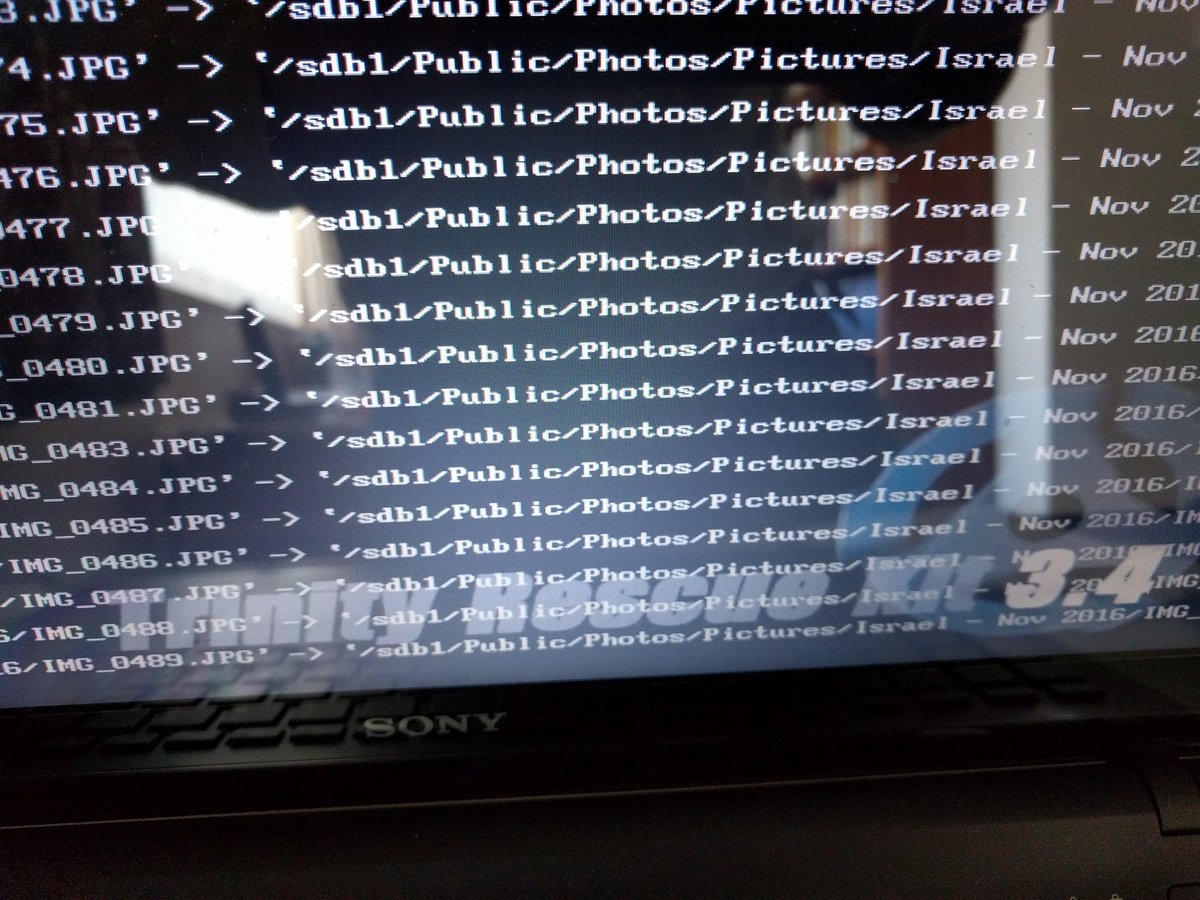

Rescuing precious photographs in Trinity Rescue Kit

A few hours later, I had a memory stick full of data, but didn’t know whether it was useful or damaged.

Putting that memory stick carefully to one side, I decided it was time to take a look at Windows.

Booting the damaged copy of Windows

A quick trip back into the BIOS to reset the boot type to UEFI, and checking the network was unplugged, it was a matter of starting Windows normally. Windows booted fine, but into Safe Mode. I immediately got a couple of ‘application failed to start’ errors, and then noticed a number of drivers were missing, meaning things like audio services and networking were broken. Trying ipconfig at the command prompt gave no results, suggesting to me that this was indeed a broken copy of Windows (although on reflection I realise it might well have just been Safe Mode without Networking, but I wasn’t taking chances…)

Since restoring Thunderbird email by copying a whole profile, rather than the mailbox, isn’t the recommended route, I put a copy of ImportExportTools on another (clean) memory stick and used that to install that add-on into Thunderbird. That then allowed me to export the mailboxes as ‘mbox with subfolders’ onto that same memory stick.

I noticed the tell-tale sign of a recently installed copy of Citrix LogMeIn (which I imagine the hacker had used to gain access) and also spotted that ESET NOD32 (their anti-virus program) and Windows Defender were also both failing to start, but other than that I sadly didn’t have time to do too much looking around at what had been done. I did however open a couple of documents at random successfully, which suggested the attacker hadn’t been entirely successful and we’d got off lightly. Maybe the rescued files on the stick were OK after all.

I took both memory sticks to an old, offline, laptop (which I wouldn’t have been particularly upset about if it had been infected) and scanned them with another up-to-date copy of ESET NOD32. Nothing found. Another piece of good luck.

Wipe and reinstall Windows

I only had a weekend to spare, and I knew there was a lot still to do, so rather than detailed forensics, I decided to completely wipe the disk and start again. Knowing there were the recovery partitions on the hard-disk (because I’d seen them under TRK), I decided to use that route rather than the Recovery Media I’d burnt. This turned out to be a mistake.

What I’d forgotten is that the laptop had originally shipped with Windows 8.0, and been upgraded as part of the free upgrade to Windows 10 offer for the first months after Windows 10 had launched (now expired). ‘Formatting’ was fairly instantaneous (I assume it just removed the FAT) and within half an hour, I had a clean copy of Windows 8. Better than a broken Windows 10 , but not what I had wanted or expected.

That lead to a question – the free upgrade offer had expired. Would the Windows 10 recovery media (which is only designed for rescuing a copy of Windows 10) allow me to upgrade from 8, and would Microsoft’s licensing be clever enough to respect an attempt to license 10 on the basis of previous installation on the same hardware without needing payment for the upgrade? Much to my pleasant surprise, the answer to both questions is ‘yes’. Well done and thank you, Microsoft. That’s very nice.

(An aside for those who are unaware and might have forgotten as I had – Windows 10 doesn’t have serial keys as previous versions did. The ‘key’ was generated in the original upgrade from 8 to 10 and stored against a Hardware ID in the Microsoft account linked to the installation. Evidently the recovery media was magic enough to notice that the hardware matched a previously-permitted key, and so allowed the activation transparently.)

Whilst all this was happening, back on the laptop, I checked more of the files I had recovered. 100% of the sample I tried were fine, other than some filenames having lost special characters because of going via Linux. A small price to pay. We wouldn’t need to reinstall file-by-file from the File History drive plus the backup I had ready-to-go in S3. Another bit of sheer luck.

Restoring data

About six hours after I’d first booted into TRK, we had a clean, freshly-installed, copy of Windows 10 ready to go. It was then ‘just’ a matter of spending about another four hours installing and configuring software, creating user accounts, linking Dropbox and OneDrive accounts such that those files would restore themselves, and then copying all the files back off the memory sticks.

For the Thunderbird email client, I restored the mailboxes again using the mbox files created by ImportExportTools and then copied the address book files (abook.mab and history.mab) from the profile backup I’d made in the first place, into the new profiles.

The final step was to change passwords. Everywhere. Since I don’t know what the attacker had done in the time he had control of the machine, this meant Internet Connection passwords, Router admin password, WPA2 PSK, Windows sign-in password, Google account password, Email passwords, etc. etc. And then, of course, every other device on the network had to be reconfigured to match. This took about 90 minutes, partly because of a wireless printer which didn’t seem to be designed to deal with a change in the WPA2 key. In retrospect, it would probably have been ‘safest’ to change passwords before restoring the files and linking Dropbox/OneDrive accounts but I don’t think this has caused a problem.

About twelve hours after starting, the damage (to the computer at least) had been undone. The contents of the two memory sticks used were then archived in Amazon Glacier, just in case I need to refer to them again.

Of course, there’s always a blindingly obvious thing you miss when doing these complex tasks at short notice, and in my case it was that I hadn’t virus-scanned the external hard disk that had been connected to the laptop, prior to reconnecting it. Luckily, I’ve since checked that and it is fine, too.

Lessons learnt

  • Keep backups. Multiple backups, including offsite ones. Although it wasn’t needed, knowing I had the copy I’d put in S3 if it were needed, was greatly reassuring.
  • I was exceptionally lucky that only Windows System files and Program Files seemed to have been affected, allowing me to rescue the machine with no data loss.
  • TRK is invaluable, but you don’t want to be learning complex Bash incantations as you go. It’s probably worth spending the time to learn the main ones.
  • Windows 10 licensing with regards to upgrading from Windows 8 is magic and, again, I was very lucky everything just worked when I mistakenly restored Windows 8.
  • I need to find my parents a more sustainable way of backing up Thunderbird profiles automatically, since File History doesn’t seem to cover the AppData roaming profile directory.
  • Despite all the times I’ve told my parents to always tell me if something’s wrong, people are liable to panic and do stupid things when it comes to cyber-security if they get scary warnings. All I can do is to reinforce the message that there are bad people out there and make myself responsible for checking everything important is safely backed-up.

As I said in the beginning of this post, it’s possible this wasn’t the best way of handling the situation. I was very much thinking on my feet, having not done it before. Let me know in the comments if you think of something I missed or could have done better.

Of course, it may yet turn out that the technical challenge of resurrecting the computer was the easy part. I have no idea what data (if any) was stolen in the attack, and so there’s the potential for serious identity theft and further fraud. My parents have been given a careful warning to be wary of everything.

This incident has been reported to www.actionfraud.police.uk, and also to my parents’ bank, who have put a fraud watch on their account. I’d strongly urge anyone else in this situation to do the same.
My first six months in a new role

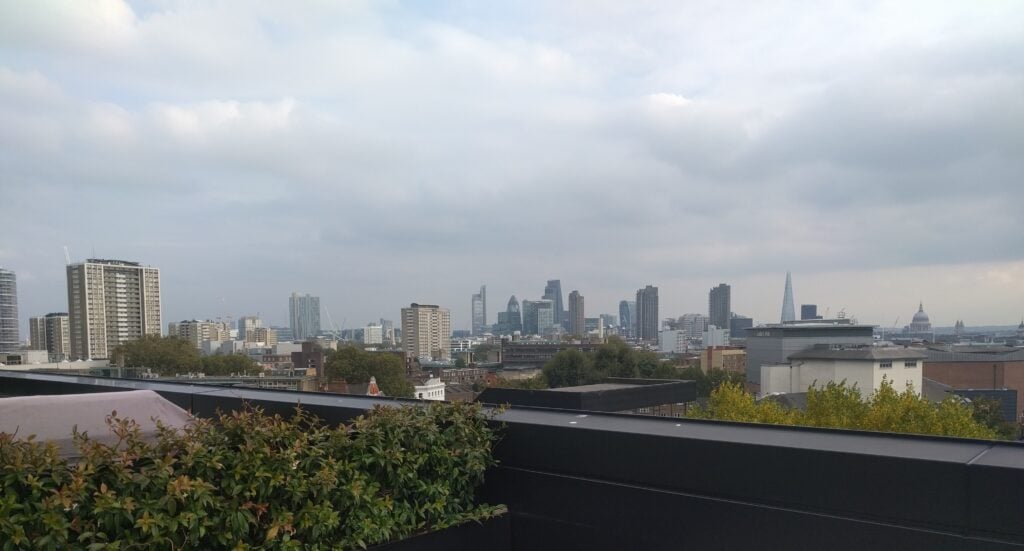
The spectacular view of the London skyline from my office roof

As those of you who know may will recall, I was made redundant from my job as a Scrum Master at Redgate back at the end of May 2016.

Luckily, I wasn’t out of work for too long and since July I’ve been working at a major multinational ecommerce player in the travel and tourism sector (very boring company rules on publicity mean I’m not allowed to name it in blog posts but that doesn’t matter)…

The team I’m in is a backend data team, looking after a number of the main company data sets. As such, our ‘customers’ are the business analysts and finance people who use that data in their reporting.

The wide variety of the sorts of data we handle means that the team is split into sub-teams, handling everything from the basic booking data to feeds of bookings with commission payable on them, and from the data relating to A/B testing on the website to the OLAP cube that’s used by the financial people for reporting up to the CEO.

New challenges

This role has brought a number of new challenges for me so far, which stem just from the nature of the job:

  • Our customers do queries in the databases we provide, so ‘user stories’ are often no more interesting than ‘provide this data in a new column in this table’. Sure, we can explain the business value but there’s no concern about usability and, with the stakeholders in the building, there’s often no interpretation required about what they are actually trying to achieve.
  • Being a publicly-listed company, there are significant overheads from security and auditing concerns. As much as I might like the team to fix their own problems, they don’t have access to a lots of the production systems they deal with in order to enforce separation.
  • Since I joined, it has become a global team, with people in both London and Bellevue (Seattle). In an attempt to avoid siloed knowledge, we have refrained from having some work done in the US and other work in the UK – the work is shared between the two locations, even though this creates a bigger need for communication.
  • Like any team handling backend systems, work is regularly interrupted by critical production issues that can’t wait. This is made more difficult by the fact that we’re handling very big data where processing times are measured in hours if not days. Any delay in fixing a problem can have significant impact on downstream systems and, ultimately, the ability of people to do their jobs.
  • The sub-teams work with a Technical Product Manager, rather than a Product Owner as defined in Scrum. The difference is that the TPM owns not only prioritisation but also provides a lot of detail (sometime too much) on the implementation side.

The first few weeks

As is always recommended, I spent my first few weeks watching how things were working and understanding what I should concentrate on trying to assist with first, resulting in a set of objectives for the first few months, such as:

  • Restarting retrospectives
  • Getting epic-based swimlanes on the Scrum board

    (Individuals had their own work in their own swimlane, which was clearly hindering the notion of working as a team when they each had diverse work to do, and would make migrating towards a Kanban approach in the future problematic)
  • Stopping the useless sprint demo sessions the team was having

    (Stakeholders never attended them and so it was just a ritual for the developers to show each other what they had done in deep technical detail)
  • Supporting the existing initiative to have dashboards showing what data was available and how up-to-date it is

    (The team was working in a very reactive way and often wasn’t aware of problems until our end-users had spotted them.)
  • Improving communication with stakeholders through introducing regular A3 Reporting on high-profile / larger projects

There were two much bigger things on my plate, though, which I’ve spent the bulk of the last few months on: getting the Bellevue team set up and developing the sub-team that’s responsible for the OLAP Cube.

Creating a remote team

This was actually a process that was underway around the time I started. My line manager had just moved to Washington State from London to found the team there, and moving the two Indian developers to the US was just the first step. Between October and December 2016, we had two more developers join in America too.

What fell to me was the practicalities of making this work, when the majority of the developers were still in London, as were all the stakeholders. When it had just been two developers in India, standups could still happen in the morning in London, which was early afternoon in India. The switch to the Seattle area now meant that it was the middle of the night there during the morning in the UK. I didn’t want to move the London standup to the late afternoon, as that would rather defeat the object in my opinion, so we introduced an additional catch-up call at 4pm UK (8am Pacific) to ensure work is kept in sync. To complete the cycle, the team in Washington State leave a message in HipChat at the end of their day, which we can pick up the following morning.

This sort of practicality, and the need for planning and retrospectives to be held at the end of the London day, is easy to resolve, while not ideal. It has certainly led to me having a very odd-shaped day, where I’m relatively free during the middle of the day, and very busy with successions of meetings at the end. The most unexpected issue we’ve faced is a perception among stakeholders that quality has reduced: If things broke overnight London time, they were used to it being resolved by the Indian developers before the stakeholders arrived at 9am UK. That no longer happens, of course.

The biggest issue however, predictably, is communication. As I’ve said, we’re trying to avoid silos by having work shared between people in London and Bellevue, rather than allocating different tasks to each place, but that means getting communication right is incredibly important and complex. Add into the mix the need for the TPM in London to answer the majority of questions, and you’ll understand the difficulties when there’s only 90 minutes of time overlapping between the two offices per day. We’ve already had a couple issues where the Bellevue team-members weren’t quite aligned on the project goals, and a near miss where work was almost duplicated between two people in different places.

Cube team

When I started, the Cube team was in a really bad place. Unlike the rest of the wider team, they’d been pretty much ignored and didn’t really have any process at all – neither Waterfall, nor a form of Agile. They had lots of disjointed, small tasks with no real stories tying them together, and a technical debt backlog kept separately from the product backlog. We’ve had a couple of stories that were aborted during development, because it became clear that the value wasn’t as expected. Above all, however, the people in the team didn’t get along. There was a lead developer, who had the technical skills but struggled with people skills. He was also the original (only) team member. Subsequently, another, more personable, team member had joined and had been made team lead before I started, which naturally caused some tension between him and the original developer. And, most recently, a new junior developer had come into the mix, and was naturally caught in the tensions between the two, which I think was partly a cause of him having little confidence.

What a dream scenario! I believe strongly that people problems can be fixed if caught early enough. I took them through a ‘5 Dysfunctions of a team’ training session over several weeks and we managed to resolve many of the interpersonal conflicts. Simultaneously, I put some gentle pressure on the TPM to improve the roadmap and started setting them up with a basic sprint cadence and teaching them Scrum. This doesn’t come overnight, of course, and they’ve struggled to complete their sprint commitments but by showing them data on what their velocity is, we’re getting nearer.

The plan from now on

The next few months are also going to be very busy. A couple of new major projects is almost certainly going to result in having to adjust the team structure slightly. But beyond that, there are a number of more fundamental things to fix:

  • I want to get the OLAP Cube sub-team working closer with the other sub-teams that they are dependent on. This isn’t helped by them having a different TPM and a different roadmap.
  • I’m introducing a more thorough kickoff process for larger pieces of work, moving from a model where one or two people do a spike and produce reams of spike documentation, to one where the whole team is involved hearing directly from the business what the requirements are.
  • Starting to experiment with introducing BDD as a way of having conversations about the requirements.
  • Set the expectation that Sprints should end with a tangible thing that can be demoed. At the moment, everything is still very waterfall. I see creating regular, tangible, value as the key to getting stakeholders back into demo sessions.
  • Starting to introduce Kanban in the sub-team that has most production issues to deal with.

Exciting times ahead… 

Pain with decimals in Alexa Development

I don’t typically write a blog post like this, but I’ve had an infuriating day messing around writing an Alexa skill, and wanted to explain the issues I’ve faced for anyone else trying to do something similar.

First though, an important note: because of the problem I haven’t submitted the skill to Amazon, so only I can use it at the moment. Don’t bother trying to enable it for your Echo at the moment.

Objective

I wanted to write an Alexa Skill (that’s Alexa-speak for an app) to help other radio amateurs with a very common problem: Given a dipole antenna of a certain length, which you know to work efficiently on a certain frequency, how much do you need to cut or add to make it efficient at another (target) frequency. I therefore wanted to be able to do something like this:

Alexa, ask Dipole Calculator how much I need to cut off my dipole to move it from 14.1 to 14.3MHz

There’s a simple formula to deal with this, which we don’t need to go into here, but the critical point is that moving resonance by a few hundred kHz (that’s to say 0.x MHz) is very common. If you wanted to change frequency by anything larger than that, you’d probably start rebuilding the antenna.

Translating this for Alexa

For those who haven’t dealt with Alexa programming before, you need to know that Alexa commands for custom skills are in a very defined format:

  • ‘Alexa’ is the wake-word, to wake the Amazon Echo up
  • ‘ask Dipole Calculator’ is the Invocation, which tells Alexa which skill to use to interpret the rest of the command
  • the rest of the command is the Utterance, which is the only bit that’s defined in the skill itself

    (For the purposes of completeness, Utterances are linked to an Intent through a file called the Intent Schema, and Intents are effectively functions or methods, which is how Alexa gets stuff done.)

Utterances can contain Slots, which is Alexa’s terminology for a variable. In my sentence above, ‘14.1’ and ‘14.3’ are the slots within the utterance.

The problem

Which is where we get to the problem…

Slots are effectively very strongly-typed. Presumably this is to aid the speech recognition to narrow the number of possibilities for what you are saying. Thus, for each slot in your utterance, you need to define the type for that slot. Built-in examples include AMAZON.NUMBER (an unsigned integer), AMAZON.DATE (a date), AMAZON.DURATION (self-explanatory), etc. You can also define custom enumerations. Note though, that there’s no equivalent of a float or a decimal. This means that I can’t just have two slots (a current and a target frequency): 14.1 wouldn’t be a valid AMAZON.NUMBER, and so it would throw an exception. I obviously can’t realistically create an enumeration of all possible values either.

There used to be a AMAZON.LITERAL type which would return an untyped value, but that’s now deprecated. It’s available in the US English locale for just the next couple of weeks, and those of us in UK English can’t use it at all. Annoyingly, this means that if the speech recognition can’t interpret the value in the slot, it seems there’s no way to find out what the Echo ‘heard’. All you get if a ‘?’, representing the fact that the value couldn’t be matched to something valid for that slot type.

A possible solution?

Trying to think about a way around this, I thought that a good approach might be to create four slots:

[Current integer] point [Current decimal] to [Target integer] point [Target decimal]

In my example above, these four slots would have the values 14, 1, 14 and 3 respectively, all of which are valid AMAZON.NUMBERs.

We’ll come back to this case later, but for now let’s try an easier case, where there’s just one frequency involved: I’m going to calculate the antenna length for a single frequency.

I put this into my Sample Utterances file in AWS Lambda:

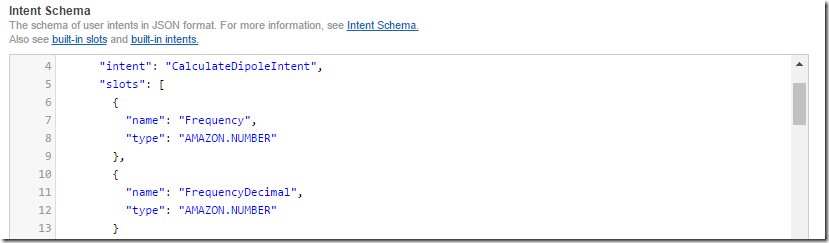
And set the types in the Intent Schema:

And sure enough it appears to work in the text simulator:

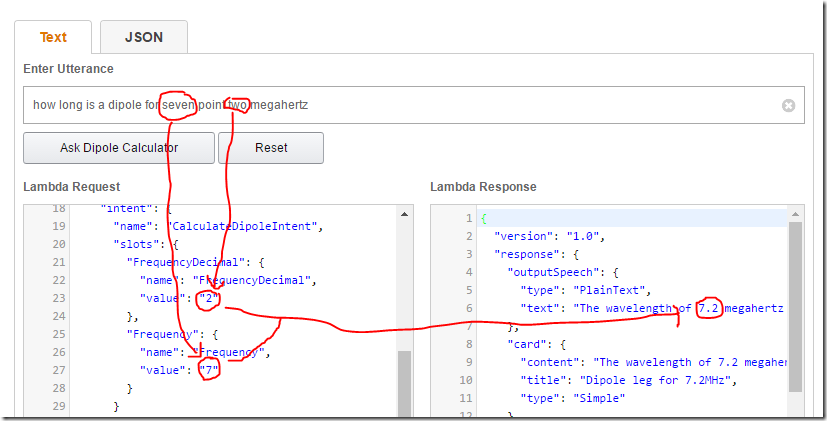
When you try to issue the same command in real-life, however, the number after the decimal place is ‘lost’:

To check what’s going on, I add a console.log() to the function where I run parseFloat(int + “.” + decimal). Checking the logs in AWS CloudWatch reveals that the FrequencyDecimal wasn’t considered a valid value for AMAZON.NUMBER, and so has come back as the infamous ‘?’.

Weird.

Let’s return to the previous, more complex example.

In this case, the decimal place for the first frequency is interpreted correctly, making it evident that my approach should work. But the decimal from the second frequency has again gone missing:

It’s not only me facing this problem, either. There are a number of posts on StackOverflow and also the Amazon Developer Forum (such as this one) without conclusion, other than advising to use literals, which isn’t an option anymore.

Conclusion

  • You can’t have a decimal value type for a slot
  • You can work around this limitation by creating two slots, one for the integer and one for the decimal, and then use parseFloat() to stitch them together
  • But this workaround for some reason won’t work in real life for the last decimal slot in the utterance, even though it appears to be fine in the simulator

Aaarrrggh!

Direction, momentum and oil: Why software development teams are like bikes

I haven’t posted for a while on what I’ve been up to at work and there’s a good reason for that: the team I’ve been working with was pretty dysfunctional twelve months ago and I’ve been spending the last year trying to turn them around. In this post, I’ll describe that journey and why I’ve concluded that software development teams are like bicycles.

Context

I was first asked to spend a couple weeks in April 2015 working with Redgate’s SQL Monitor team as an external observer, finding out why their Project Manager was struggling and why the team was perceived as delivering slowly. In this environment, some of the team were even starting to leave the company…

A bit of background: the SQL Monitor project had been stopped for just over a year after the release of version 4 in January 2014. In the intervening time, no work had happened on the product, and the original team had disbanded. Many had gone off to do other things. In the meantime, revenue had continued to increase and so, in early 2015, the company decided to form a new team to continue that growth. The new ‘team’ (a mix of different people that had been cobbled together, most of whom had no experience on SQL Monitor) would work on one feature in order to get used to the codebase, while the company decided on what the further roadmap looked like. That didn’t sound like a team set up for success.

In my favour was the fact that the team knew they had a problem and so were prepared to work with me to address it. We didn’t have much time, though: the following week, two newly-hired developers were set to join them and we needed to make their introduction as good as possible. So, the usual advice that a Project Manager / Agile Coach should just start by observing the team went out the window. I had to act fast.

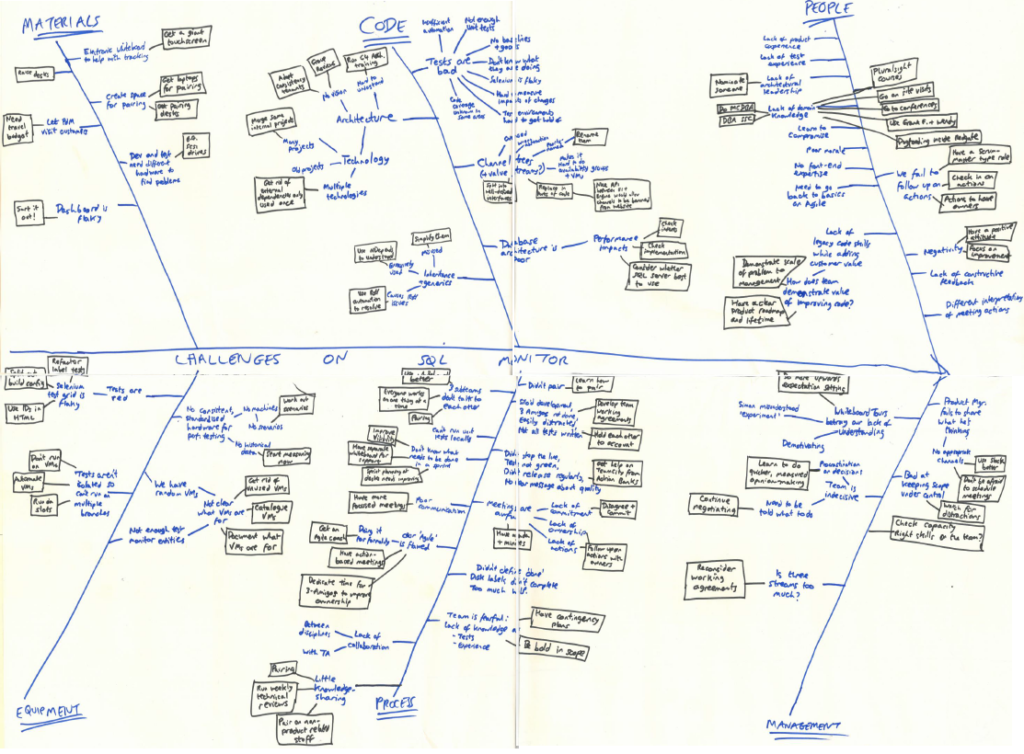
I started by organising a retrospective with the team to investigate their various problems. This was a fairly painful session, which I facilitated, using a fishbone diagram technique:

Fishbone diagram

As expected, there were a number of really fundamental issues here, mainly with the state of the code, but feedback was that it was quite cathartic for the team to see them written down in one place.

To summarize, this was a pretty bad situation: the team had no goals, no deadlines and were struggling to do valuable work. In other words, they had no direction or momentum and the bicycle chain wasn’t even allowing the different parts to work in concert.

Giving a direction

During the same week as that retrospective, I sat down with the Product Manager and got his opinion on commercial direction. It turned out he had a presentation, that had already been presented to other managers, with his idea of a roadmap. It was a well-thought through plan; it’s just that the dev team hadn’t yet seen it. That was another easy fix – I got the Product Manager to give the presentation to the developers and let them challenge the rationale. With this approved, he could then go away to create a 5-year roadmap – rather unusual at Redgate but vital for giving the developers a sense of confidence that the project wasn’t about to be stopped for another year again.

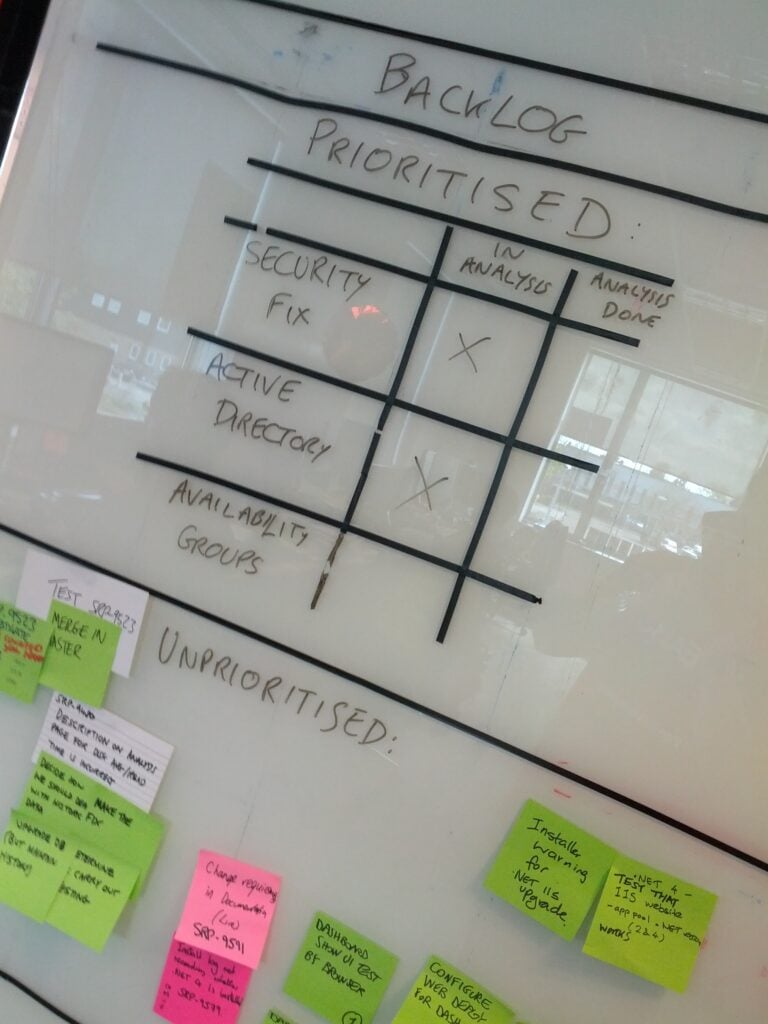
The outcome of the Product Manager’s work was that there were two obvious big features to be done soon – support for Active Directory and support for SQL Server Availability Groups. Both of these were features which competitors had implemented already, and were actively costing us sales. The work felt likely to take a few months, it was mid-April 2015 and there was a big tradeshow, SQL PASS 2015, coming up in October. The way forward seemed clear. I’d re-focus the whole team on those two features and temporarily shut down the other distractions the small team was simultaneously trying to work on (mainly support escalations and code quality improvements). Stopping distractions, and especially support escalations, isn’t easy, and can’t be a long-term solution, but in some cases I’ve found it to be a very useful tool. If you have the right conversations, even the support personnel in the firing line from customers can be brought into the idea.

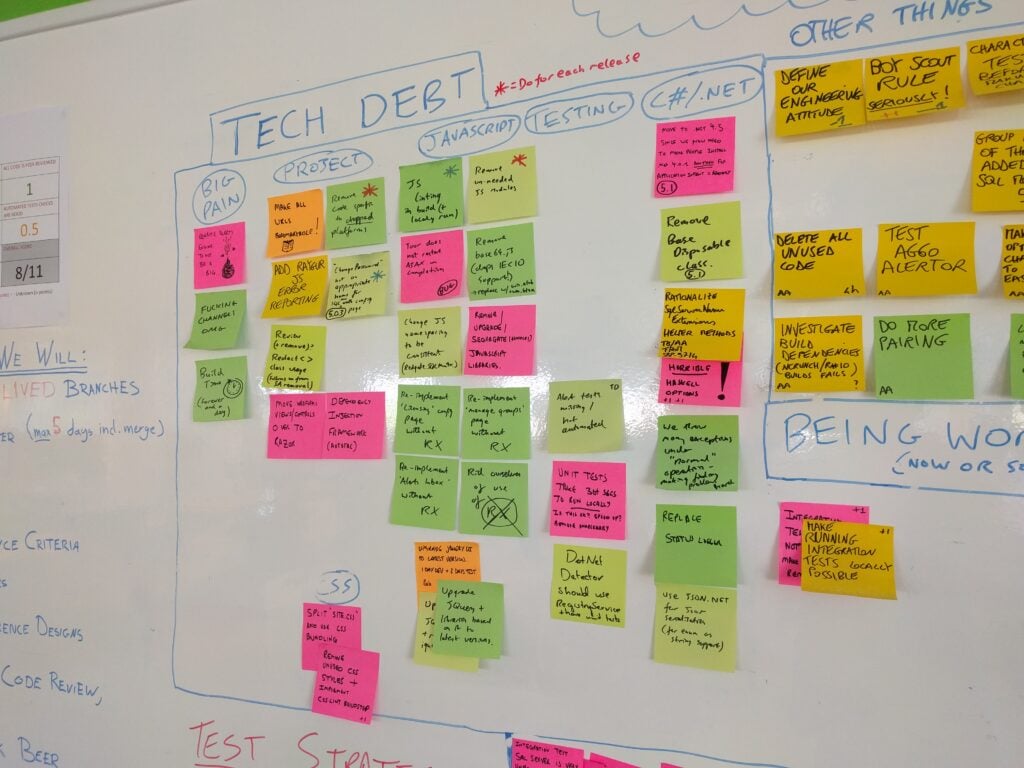
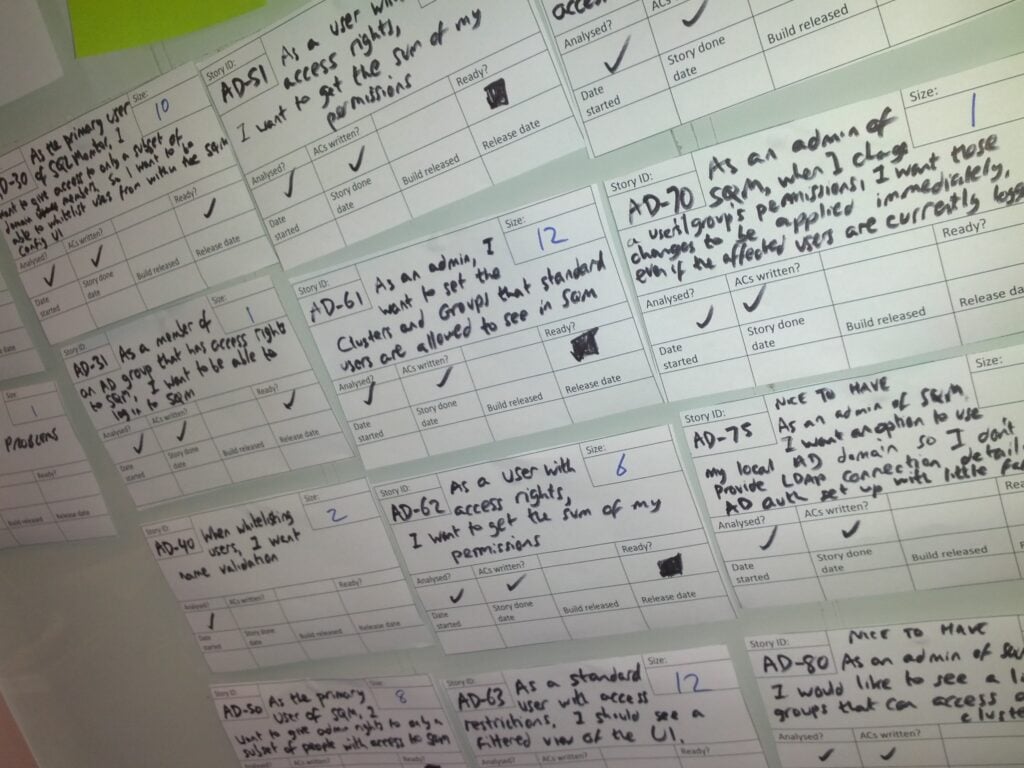
Some people may question the idea of stopping the work to address code quality but the fact is that random pieces of improvement work were being picked up by developers with little planning or sense of what the most important work to do was. Instead, I asked the team to just write down the known technical debt on Post-Its as they were discovered, and stick them to the wall. Together with the actions from the fishbone retrospective, that became a visible reminder of how much debt needed paying back and, in due course, would form a backlog of improvement work to be addressed.

The tech debt wall

Of course, things never are straight-forward. Just as I was starting to get this running, a critical security vulnerability was found in SQL Monitor 4.1. The plan had to be put on hold while SQL Monitor 4.2 was released, and the fix was also backported to previous versions of SQL Monitor.

Explicitly showing what work is prioritised and what is to be done later on

 There – my job was done. The team had a road to follow and, a month or so after joining them, I could leave them in the hands of their normal Project Manager to continue the work…

Speeding up

At the end of July, I returned from a holiday to discover that the existing Project Manager had decided that he no longer felt confident in managing the project. It was a very brave decision to make, and meant that I was catapulted back into the SQL Monitor team again – this time as full-time Project Manager.

My job, though, was fairly obvious by now: keeping the team focused on delivering in time for SQL PASS 2015. This mainly consisted in keeping a fairly tight reign on the team’s approach to sprint planning and capacity planning, at least at first. This ensured also that there was no time available for some of the quality improvement work the team wanted to do, a deliberate choice by me to keep the sense of purpose. Over time, we found a way to handle support escalations once again, and I eventually released the brakes I’d artificially applied to guard against scope creep/changes.

To bring the team back on track, we enforced user stories, estimation and acceptance criteria.

We did it – SQL Monitor 5.0 was released just before the tradeshow, on time and without significant amounts of cutting things from the planned scope.

Through the work on version 5.0 we’d deliberately not released frequently: releasing was hard and required extensive manual testing because the automated tests were unreliable or covered the wrong things. Given the length of time since the last major release, and the team’s lack of knowledge, trying to release regularly could have caused too many derailments.

So, having reached SQL PASS 2015 intact, it was time to set the next challenge for the team: work out how to release frequently. For the major release, the testers had done an extensive risk-based analysis on the major areas of the product they’d need to test. They now used that as a first step to working out what minimal testing would be required. Meanwhile, the developers set to work getting rid of those unreliable automated tests, replacing them where possible, and changing our branching strategy so we’d always be in a position to release.

And that backlog of improvements to the code we needed to make? I got buy-in from the stakeholders so that we could keep our promise. We gave the team two months, without pressure to deliver features, to start working their way through the backlog.

By the start of 2016, we could release every sprint and some of the most egregious code problems were gone. The bike had gained its own momentum.

Providing the oil

Naturally, it hasn’t all been completely plain-sailing. The release notes from the start of 2016 show that there were several bugs and regressions that we introduced as we moved to the new model. For the customers who were affected, we’re sorry. But the fact that the SQL Monitor code, while still far from perfect, is improved, better understood by the team and able to be released quickly means that we’re in a much better position to do some great work in 2016 than we were last year.

By now it should be clear what my role in all this was. The team is pretty much unchanged. The way they work is only slightly different. The developers, testers and designers are still the gears, chain and wheels of the bike. Without them, we wouldn’t have a bike at all. My job was one of lubrication: providing the oil and a bit of direction and momentum to ensure they could go on their journey. It was done through adding brakes and stabilisers where necessary to prevent them from going too far off-course in the early days, then empowering the individuals by giving them the time and space to address the problems they wanted to fix and by protecting them from the mud of management that might have interfered with the way they were working.

Postscript

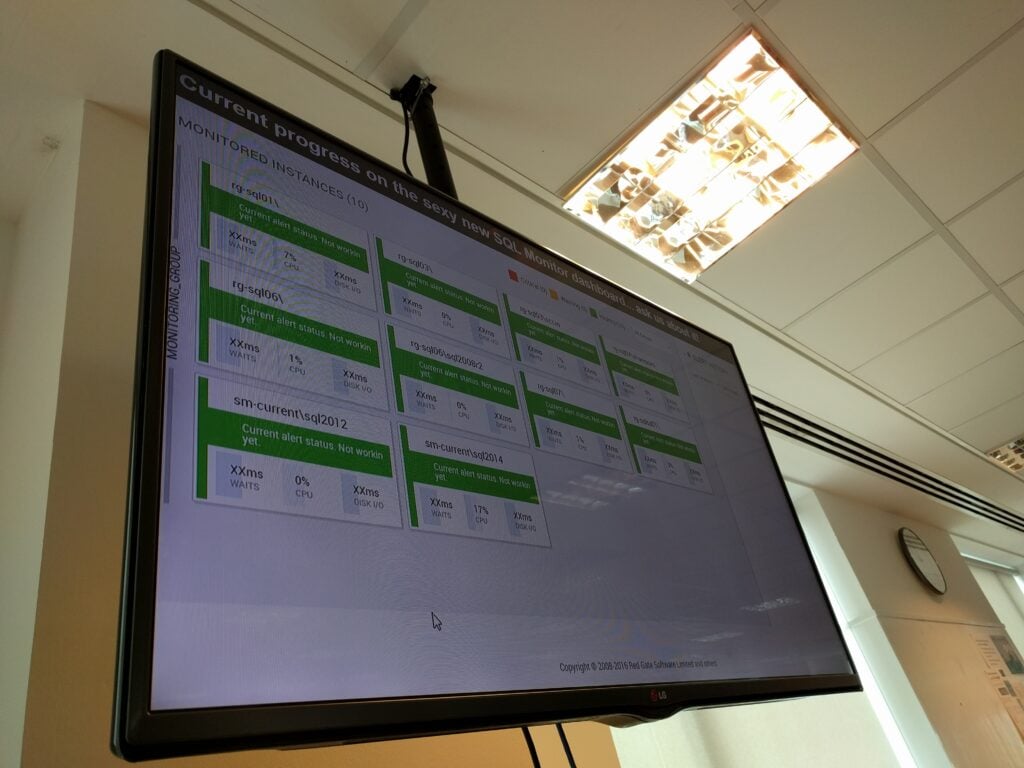
The team’s now working on some really exciting stuff ahead of SQL PASS 2016, including a very impressive new dashboard which is nearing completion.

As for myself, my mentor, Simon Cromarty once told me that the aim of any project manager should be to make themselves redundant: You succeed when the team doesn’t need you any more. So, in a rather perverse way, it should be good news that I stand to be made redundant from Redgate in the coming weeks. If you need someone to help oil your bicycle,  let me know…

Postscript: Reflections on 40 days in Chile

So my trip’s over; what did I learn? Well before I get to that, a little about my trip home:

Coming home

The journey back from Santiago was tiring, of course, but quite pleasant. We flew in EC-LEU, a much more modern A346 than the one we went out on. It had in-seat touchscreen entertainment, and even WiFi and a GSM picocell (though I didn’t investigate the cost of these). On the other hand, I didn’t get much sleep. Iberia had a slightly odd approach to the in-flight service, too: in addition to the basic evening meal (pasta) shortly after take off at around 4pm CLST, and a light breakfast just before landing at 06:30 CET, there was a half-salami sandwich at midnight CET. My body-clock really wasn’t sure what meal that was supposed to be! We were also about an hour late taking off from Santiago as the luggage belt had apparently broken and so we had to wait for two containers of luggage to be delivered to us. At least the plane did wait, though, and we were still away before the strike started. We arrived more or less on time too, thanks to a decent tailwind over the Atlantic, but that did also make the flight a little bumpy, particularly as we crossed the equatorial zone.

The flight back from Madrid in G-BZHC was rather less comfortable. I didn’t know BA still had some really ancient B763s in their fleet but apparently so. It really was quite old. We were also twenty minutes late leaving thanks to an ATC strike in France that had slightly reduced capacity over their airspace, but again, a decent tailwind (which has also been keeping Western Europe very mild for December) meant that we landed about on schedule. I was lucky too: not only did my bag survive, but it was one of the first off too.

There was just one amusing thing to describe from the flight: my Bencher morse code key (which was in my hand-luggage as it’s a little fragile) looks similar to a battery on an X-Ray machine and so throughout my travels it had raised eyebrows in security, but no problems. In Santiago, the same was true again, but this time the X-Ray machine worker was so interested when I showed it to him that he took his eyes off the screen and let the conveyor belt run everyone else’s bags through unchecked, while he and I had a discussion about how it worked!

What I learnt

And so now, here’s the what I learnt about life in Chile. Hopefully this will be useful to anyone else going there:

Money

Credit cards, as I had read before I went, are very widely accepted, and there isn’t any of the ‘major credit cards’ distinction we have in the UK. Anywhere that will take Visa/Mastercard will also take AmEx and Diner’s Club. You are often asked whether it’s a Credit Card (if the merchant doesn’t ask and presses the button for the national RedCompra debit card system, the transaction will be refused) and sometimes you’ll be asked which currency you want to pay in (see below). European chips aren’t generally recognised by the machines and need swiping. Contactless payment, which I only found in one supermarket, doesn’t work with a UK card. When you use a credit card, you need to give your passport number in addition to signing. I’d suggest memorising the number to save time at checkouts as getting passports out can be frustrating. You’re sometimes also asked whether you want the transaction to be sin cuota or con cuota. It seems that Chilean credit card terminals can separate transactions into multiple payments over time, presumably so you can take advantage of interest-free installments offered by the merchant, rather than by the card company. Anyway, I always answered sin cuota, and everything worked fine.

ATMs are also plentiful. I found that Banco Estado machines didn’t work with Visa Debit cards, but both Santander and BBVA did. Watch out though, as Santander add a 5000 CLP (£5) fee to the transaction in addition to any fees charged by Visa / your bank. BBVA don’t charge this fee. When you use a cash machine, there’s an odd question you have to answer, about whether the card is for a Credit Card / Savings Account / Checking Account / Current Account. I found that Checking Account worked for UK current accounts. Machines that had the Current Account option didn’t always approve the transaction.

The one mistake I made was taking US Dollar-denominated AmEx traveller’s cheques (for the additional security these provide). I only found a couple places in Santiago that would exchange these; most places won’t touch them, and where they are exchanged the rates are very disadvantageous. (E.g. 600 CLP = $1 for buying traveller’s cheques, when the same place would buy dollar cash for 706 CLP. I even found one place offering 500 CLP = $1).

If you’re booking hotels, you’ll almost certainly have come across the strange VAT rule: to encourage tourism, hotel stays for foreign tourists are exempt the 19% VAT charge. In theory, to show you’re a foreign tourist, you have to pay in US Dollars (hence why you may be asked what currency to pay in), they have to take a copy of your passport and immigration receipt, and you have to declare that you are staying less than sixty days. That’s the theory, but not all places adhere to these rules in practice. Some places will allow you to pay in Peso cash but will make out the invoice in Dollars, for example. Only one hotel I stayed at didn’t know how to deal with a foreigner under this VAT rule. If that happens, you need to ask for a Factura de Exportación (Export Invoice), which will prompt them to handle it correctly, even if you think that the it would be hard to export a hotel stay! Incidentally, I found that campsites worked on a Peso cash-only (no cards) basis, with no need to show passports. I didn’t get receipts from the campsites either. Hostels (as opposed to hotels) were also generally cash-only but did take passport details and issue Export Invoices.

Driving

This section is, like the rest of this post, based on my experience only. I’m not an expert on Chilean driving law, so you should check what I’ve written here.

I didn’t drive anywhere particularly busy, and certainly not in Santiago, but driving was quite easy. Ruta 5, the Panamerican Highway, is very good quality and is mainly dual carriageway (it goes to single carriageway on Chiloé). Ruta 5 has a general speed-limit of 120 kph, which is generally followed by most drivers.

The main thing to watch out for on Ruta 5 is that, like all other roads in the country, it has bus-stops with pedestrian crossings over it: not what you’d expect on a fast motorway. These are signposted as 30kph zones (see below on speed limits) but everyone ignores that unless a bus is around, as to do 30kph on such a fast road would be dangerous.

Other major roads, where the speed-limit is 100 kph, are of variable quality. Some are good; others may be little more than unsurfaced dirt tracks. Maps do show which roads are surfaced and which aren’t but I found they were often out-of-date.

I soon learnt that the main thing is to watch the line of the driver in front of you and to follow their tyres. Very deep potholes are numerous, even on major roads. Additionally, in roadwork areas, it seems common for the roadworkers just to remove the road surface without warning, or with just a Peligro (‘Danger’) sign. One minute you’re on nice surfaced road and then there may be a gravel/stone surface, which may only be a metre long, or may go on for miles. Bridges are another thing to watch for: in the UK we take it for granted that the road surface will match the bridge. Not so in Chile: if the road approaching the bridge has adverse camber and the bridge is laid completely flat, there will be a massive ledge on one side of the road where you join the bridge. Again, follow the car in front. If it suddenly switches to driving on the left on an approach to a bridge, it’s probably to avoid this!

Built-up areas are more difficult. The speed-limit is 60kph but again this is generally ignored. The 60kph zone may not be explicitly signed either: a Zona Urbana sign at the start of the built-up area also counts as a 60kph sign. Most towns are designed on the US block system with one-way streets. In places, my Tom-Tom satnav had the one-way system completely the wrong way around, which didn’t help. In common with the American layout, crossings are generally four-way stops but there may be a prioritisation implied if some of the approaches have Pare (Stop) signs, and others don’t. An interesting Chilean feature of four-way stops is their habit of putting pedestrian crossings, across them. This means that if you follow the paintwork on the road, and stop at the stop line before the crossing, you can’t see the other roads at the junction. You have to stop on the crossing to have visibility. And then, when you turn, expect there to be a pedestrian crossing on the road you are turning into. You may need to stop in the middle of the junction until they have crossed.

Some towns have a lot of traffic lights. Unlike America, where there are traffic lights, turning right on a red light isn’t generally legal unless explicitly signed. If there are pedestrian lights at four-way stops, it will usually be green for pedestrians at the same time as it is green for cars on the road that’s parallel to the crossing, so again, if you’re turning left or right, you need to expect a pedestrian to be crossing the road you’re turning into, even if the lights are green. I only found a couple roundabouts in the whole country.

In towns, lanes were a particular pain. Often they just aren’t painted, or where there are two lanes painted, taxi and bus drivers will try to squeeze past, making a third lane! It wasn’t uncommon for lanes to change within a few hundred metres either: for example a two-lane road where the left-hand lane is for left-turns only approaching one junction and then the right lane is for right-turns only approaching the next junction, meaning cars going straight on have to do a slalom.

Speed limits, as I’ve said, are often ignored, except that people don’t exceed the 120 kph maximum on Ruta 5. This is partly, I think, due to how difficult it is to tell what the speed limit is in some places. I mentioned the example of a 30 kph zone for a pedestrian crossing across a fast motorway above. That 30 kph zone will never be signed as being cancelled. So, as you drive, you find yourself having to guess what the hazard is that has caused the reduction, so you know when to speed up once you’re past it! Equally, on Ruta 5, I often found that there would often be a 50kph or 40kph sign just before an exit. It turned out that this is because of a sharp bend on the slip-road at that exit, and so traffic continuing on the road didn’t need to slow down anyway. Having said all that, I did see a few police speed traps with radar guns on both Ruta 5 and also on Ruta 64 (the road to Valparaíso). I generally just did something slightly slower than the cars around me if I saw one of these and didn’t know what the current speed limit was!

Security

Chile felt a remarkably safe country, and all the people I met were incredibly friendly. Despite the television news which reported an armed robbery, shooting or carjacking almost every day, only one or twice did I start to feel a little uncomfortable. The police (Carabineros) are very present patrolling in all built-up areas and I got the sense they were well respected. People would have their photos taken with them and chat to them, and indeed their motto is ‘Un amigo siempre’.


So, it was a good trip. Don’t forget: you can read the full set of blog posts I wrote from each place I visited, and my photos are all on Flickr.