Cambridge Band Competition finals: Behind-the-scenes at Cambridge 105

As many of you will be aware, one of my many volunteer roles is as an Outside Broadcast Engineer at Cambridge 105, Cambridge’s Community FM radio station.

There are essentially two types of Outside Broadcast music events that we run: those where we do the live music mix, and those where we just take an existing feed and add to it. One of the latter sort of event was our live broadcast from the Cambridge Band Competition at The Junction on 29th March 2014. This is the behind-the-scenes engineer’s view.

The C105 engineer's view

So, what’s going on here?

  • The mixing desk (a Behringer X32 Compact) is receiving a feed from the Front-of-House (FoH) mix, provided by the venue. This stereo pair is the set of faders that are up on the left-hand bank.
  • For some events, we have our own additional mics to get guitar amps (which won’t be fed much/at all to the FoH) and an audience mic so we get the applause at the end. This comes to our mixing desk via a separate feed. (At The Junction, we had the luxury of a set of tie-line from the stage to the room we used for our mix. Normally, we use a Behringer Digital Snake S16 over Ethernet)
  • The Cambridge 105 presenter needs to be able to play pre-recorded music between sets. We use Caban for this, which is on the main left-hand monitor. The presenter(s) have their mics on separate channels on the mixing desk, of course, and the PC takes up another channel.
  • So far, so easy. But the presenter can’t see the stage, and so won’t know when to stop talking, or when to keep waffling. This is a good thing, because a broadcast mix is often sufficiently different from the FoH that we want to mix in an isolated environment. To solve the lack of visibility, however, one of the engineering team (most commonly yours truly) stands next to the stage with a radio mic and set of wireless headphones, and I relay what’s going on. My wireless headphones are supplied with a mix of this talkback and what’s going to air.
  • We also often have a reporter interviewing the acts as they come off stage. That reporter has another pair of wireless headphones (also fed with the talkback + broadcast feed) and another radio mic.
  • The presenter’s headphones are just fed with the off-air feed, not the talkback to avoid distractions. The mixing desk operator can type important messages to the presenter in a Notepad window on the same monitor as Caban.
  • The output from the mixing desk is fed to the laptop in the top-left, which is running Stereo Tool for broadcast compression. We sometimes also use Reaper to record the multi-track output from the desk. Typically, the compressor adds just under a one second delay.
  • From there, the output of that laptop goes into the laptop on the top-right, which is running Butt, to IP stream the broadcast to the Cambridge 105 studio. The IP stream adds another couple of seconds’ delay.
  • The laptop on the top-right also displays the studio email, where we get listener input, as well as automatic notifications if the stream should fail.
  • At the studio, a computer feeds this to the analogue mixing desk in Studio A, where the feed magically appears on a single stereo fader marked ‘Remote’.

Hacking the office

(or what happens if you mash-up a Software-Defined Radio, a radio microphone, a Belkin Wemo, a fridge, Yammer and the Microsoft Exchange Server API)

Every few months at work (Red Gate), we have a ‘Down Tools Week’. This is a chance to divert ourselves from normal product ideas and to look instead at other things we could do and problems we could address. Our Down Tools Weeks generally have (optional) themes, like creating internal tools or coming up with product ideas. In this way, the Down Tools Week in March 2014 has been focused on ‘The Internet of Things’ (IoT). Specifically, we were interested in finding the problems with existing toolchains and ways of working, rather than coming up with something immediately productizable, which of course gives a greater amount of freedom for hacking things together.

If the IoT is really about the Internet of Everything (as it was put in the keynote at the recent Microsoft TechDays Paris), where better to start than looking at writing code for some daily problems in the office?

One such problem is that, as a company of around 250 people in the Cambridge office, we lack space for whole company meetings, although we still regard them as important. As a result, we often use our canteen area for larger events, which are also streamed on the intranet. But this has a problem: canteens have noisy fridges which can disturb the event. If you turn off the fridges, tomorrow’s lunch could be spoilt, and the canteen staff get upset.

Can the Internet of Things solve this?

Identifying when a large meeting is happening

The first issue is to work out when a larger meeting is happening. Our canteen is a bookable resource in the Exchange server, so on the face of it it’s easy, but ‘Lunch’ is also a recurring appointment in the room, as are some ad-hoc meetings between individuals.

One feature larger meetings share is that they are streamed as I noted above, and this also means they use radio mics. Radio mics are, of course, nothing more than a simple FM radio transmitter and in Europe at least, they tend to be at around 860MHz. Getting a cheap receiver that can listen to multiple radio channels simultaneously is also remarkably easy: the RTL-SDR dongle is ideal for this sort of application.

Once we have this receiver, we can use the GPL’d RTLSDR Scanner software to monitor for the presence of the radio microphone. This is a nice little Python script that can output a CSV file with frequency and strength – just what we need.

Writing a bit of code lets us see when the radio mic is on. While we’re at it, we also connect to the internal Microsoft Exchange Server’s API to find out what the current appointment is. We write the appointment’s ID into a SQL Server database table to ensure we don’t query the Exchange Server more than once.

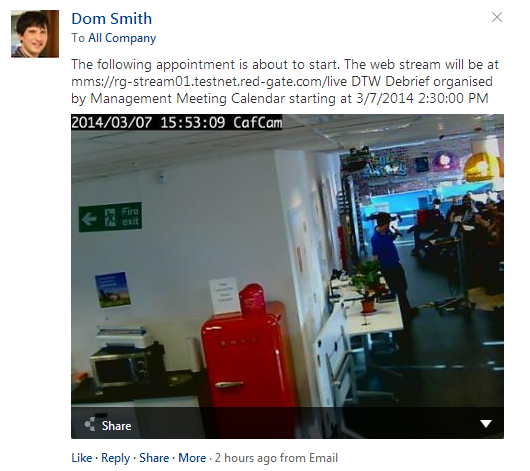
If there’s an appointment that’s just starting, we can now post to Yammer to remind everyone, giving the link to the intranet stream. The Yammer post can also contain a still from the webcam that monitors the queues in the canteen.

yammer

Turning the fridge off

The last part of the task is to turn the fridge off. I’m using a Belkin Wemo switch for this purpose, which uses a very simple (un-authenticated!) SOAP protocol to query it. The program I’ve written just fires the ‘off’ command to the switch when the data comes back from the Exchange Server API.

Turning the fridge back on

Just as important as turning the fridge off is turning it back on again. We could do this when the Wireless Mic signal disappears but we frequently have multiple speakers swapping between different mics. It wouldn’t be great for the fridge to keep being switched on for a few seconds as they swap over. So, we record the time the mic went off in the database table too. A few minutes later, if the signal has not been re-acquired, we turn the fridge on again.

So, there you have it – the result of hacking together the unlikely combination of a Software-Defined Radio, a radio microphone, a Belkin Wemo, a fridge, Yammer and the Microsoft Exchange Server API!

VP9/M0BLF: Log analysis

LogAnalysisOne of the things I like to do shortly after a DXpedition is to do some fairly detailed statistical analysis on my log. This helps highlight openings or areas of the world I might have missed, and helps me consider improvements for the next trip. It can also help identify where propagation predictions did, and didn’t, match reality.

This time, I’ve decided to share my analysis here.

Over the week, between four of us operating fairly leisurely, we made just under 16,000 QSOs, of which I made 3320.

Mode and band choice

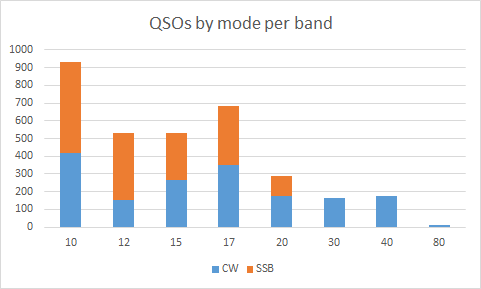
As a team, we’d decided before the DXpedition to focus on the WARC bands, because VP9 is often activated in contests. Due to the 150W limit in VP9, most of the others had also decided to concentrate on CW, but I wanted to maintain about a 50:50 balance of CW and SSB.

As indicated in the graph below, I broadly achieved that balance on the higher bands, but conditions just didn’t permit CW on 40m and 80m. Moreover, with the higher bands performing so well, I was able to take advantage of the conditions on 10m and 15m, even though that meant slightly less WARC activity than I had planned.

image

Rates

VP9 is also not a rare DXCC, so we weren’t aiming for particularly high rates on this trip. We’d wanted to have the opportunity to do plenty of tourism while we were there, too, so we were expecting to have some days with less activity than others. Luckily, we also knew that propagation around midday could be difficult on several bands, so this would give us the opportunity to go out and see more of the island.

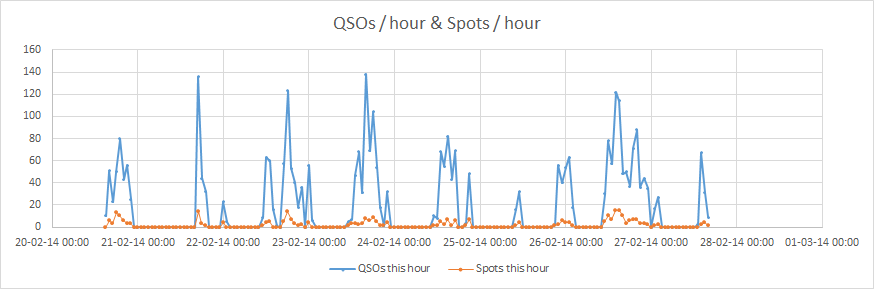
The graph of QSOs / hour reflects this, but I still managed to approach 140 contacts per hour a couple of times, despite this relaxed operation.

It is also interesting that the number of spots per hour roughly tracks the number of QSOs I was making (I‘m not sure whether this is cause or effect; I suspect a bit of both)

image

Perhaps more notable is the rate that was achievable on each band. 12m was far the most open band in these terms, which is rather a surprise, particularly when compared to 10m. Obviously the idea of concentrating on WARC bands wasn’t a bad idea. (This graph is slightly misleading in that it doesn’t take into account when I was operating and on several occasions my role was to make the last few QSOs as the band closed, while the others operated on more productive wavelengths.)

image

Geographic spread

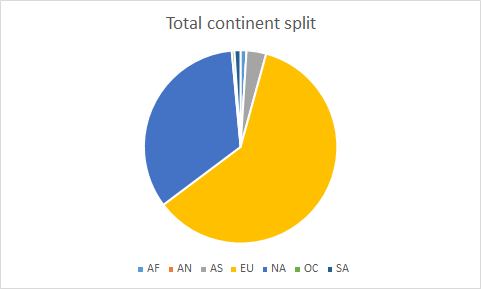
I’m rather surprised to see how skewed towards Europe my log is; it certainly felt as though I was making many more contacts to North America. It’s pleasing that there is a small number of Asian stations in there too, however. This was mainly contributed by some reasonable runs into Japan on a slightly difficult auroral greyline path over the Arctic.

image

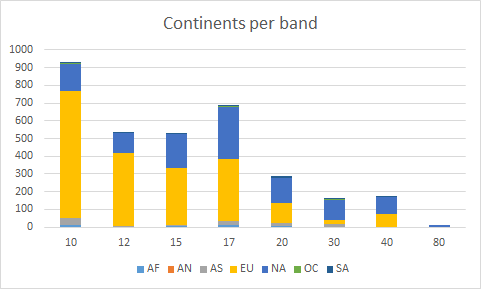
This data becomes more interesting when analysed per band, however. Whilst Europe dominated on 10m and 12m, the Europe : North America balance was more even from 17m downwards (and, indeed, North America was the source of a majority of my QSOs in 30m).

The lack of Asian stations on 12m is mainly because Martin G3ZAY operated on that band during the greyline openings.

image

I’m slightly surprised there aren’t more African stations in the log. It should have been an easy path but we just didn’t have many callers from there.

The top 20 DXCCs to call me were more-or-less as expected but, being patriotic, it’s great to see so G (England) so high in the list:

DXCC

Total QSOs

% QSOs

K 987 30%
DL 287 9%
I 284 9%
G 196 6%
EA 181 5%
SP 136 4%
F 106 3%
UA 101 3%
VE 101 3%
JA 88 3%
UR 73 2%
PA 66 2%
ON 61 2%
OK 60 2%
SM 41 1%
S5 36 1%
9A 33 1%
OM 33 1%
OE 26 1%
OH 26 1%

Anything else?

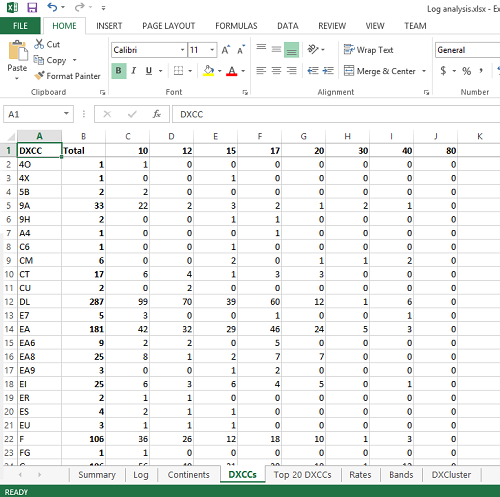
Is there anything else you’d like to learn from my log? If so, feel free to add a comment. For those who are interested, this is simply a CSV export from Win-Test into Excel, so I can easily analyse any other factors Win-Test can export.

Planning, Prattling and Parting: Calling a DX station

M0BLF operatingAs many of you will be aware, I’ve recently returned from operating as VP9/M0BLF in Bermuda.

Overall, it was a great trip but it was marred on a few occasions by some discourteous and unruly operation by a small proportion of the DXing community. A lot has already been written about pile-up behaviour but I thought I’d add my two cents from the point-of-view of the DX station. As I considered the topic, however, I realised this is basically about following some simple rules. At the risk of this sounding like a bit of a rant, therefore, here are my thoughts.

First, though, I should note that a lot of this post is focused on CW operating. That’s because my CW is weaker than my SSB, and so the problems become magnified. Generally, however, the rules are the same for any mode. I should also note that this post isn’t an excuse for my (at times) poor CW operation. It’s something I need to practice. But you, the pile-up, could make my life a lot easier while I improve my skills.

1. Planning

Before you pick up the CW key or microphone, there are two golden rules:

a) Ensure you can hear me

I don’t care whether I’m DX for you or not, or whether you need the QSO for DXCC or another award programme. If you can’t hear me, we won’t be able to have a contact. It’s that simple.

Generally, I’ll be operating split, so you should be able to hear me on my calling frequency. If policemen are getting in the way such that you won’t hear me replying, don’t call me. If there’s deep QSB, listen and learn the time between the peak and the trough, and call me around the peak only. You really slow my ability to work the whole pile-up if you call when you can’t hear me.

b) Know your callsign and how to send it

This should be obvious, but a few too many callers had to resend their callsign because they put the wrong letters in it. Similarly, and this mainly applies to people using straight keys, check you can send your callsign reliably a few times without corrupting it, maintaining the right rhythm and a 3:1 dash:dot length ratio. If you can’t do this basic thing, don’t call me. If you’re new to CW, consider programming your callsign – once – into a CW keyer memory. I’d rather have computer/keyer-generated perfectly-sent CW than errors.

Also, I’d prefer you only to send your callsign once unless I ask for you by a part of your callsign, but I know that’s not always going to happen. If you do repeat your callsign, make sure the gap is clear with a suitable break. If I hear ‘M0BLFM0BLF’, that’s likely to confuse me, particularly if I only hear part of it.

Only after you’re certain you can hear me and you can send your callsign should you actually call me.

Oh, and don’t tune up on top of the pile-up while you’re at it…

2. Prattling

a) What to exchange

Always send at my speed. I was doing 20wpm in VP9. I can receive well-sent Morse at up to around 23wpm reliably. This means that if you transmit at 35wpm, you’ll have to repeat yourself several times, which will frustrate both of us.

If I ask for you to call me by a partial callsign, everyone except the person with that partial should stop calling. If you have a callsign that’s similar to what I’ve asked for, give it a few seconds (to allow anyone with the exact match to reply first) and then call me once. Above all, make sure you know whom I’ve gone back to: two people won’t be getting VP9 confirmations because I went back to someone different.

If I ask you to repeat your call several times, don’t be condescending by slowing down or, worse, making dashes longer. It’s probably just someone calling on top of you but changing your speed makes me have to concentrate more, not less.

Unless it’s fairly quiet, I want to give as many people as possible the opportunity to call me, so I only want to hear your callsign and my report. If I’m happy to have a chat, I’ll indicate this by telling you my name and making some trivial remark like something about the weather. Let me, as the DX station, guide you on this.

If you haven’t had that cue from me, please do not ask me anything else, or give me other information. I’m highly unlikely to ask your name, let alone log it. Additional information can also be actively confusing. For example, a lot of US stations have the habit of giving their US state abbreviation after the RST report. I don’t need to know this and, if it is similar to your callsign, it could lead me to correct something unnecessarily. (If you call me as W0ABC and then send me state code AB twice, I may well ‘correct’ your callsign to W0AB).

Above all, don’t ask for QSL information. It’s widely published, and it’s probably quicker for you to look at QRZ.com or similar. And don’t ask for my ‘callsign again slowly’, especially if I’m mid-pileup. It will be on the cluster and/or RBN, and I’ll be saying it at least every 3 QSOs too. As far as I’m concerned, if you haven’t got my callsign, that’s your problem, not mine, and you should know it before you call me (don’t trust what the cluster says, either).

b) Operating split

Split operation can have two objectives:

  1. To ensure you can hear me reply to the pile-up, even if people are still calling
  2. To let me spread the pileup over a range of frequencies to be able to pick someone out better

In a smaller pileup, only the first reason above applies. In these cases, I’ll generally be saying ‘UP1’ on CW (for a 1kHz split) or ‘Up Five’ on SSB (for a 5kHz split). If you hear this, use that split only. If you go up 4kHz when I’ve said ‘Up Five’, I’m unlikely to ever find you.

On CW, however, you should add or subtract a slight offset of up to 200Hz so you don’t all end up with exactly the same beat frequency. This is particularly important if you’ve just clicked on a DX Cluster spot with a QSX frequency set in it. If you don’t move at all, you will have exactly the same note as everyone else and I won’t be able to distinguish any of you. It’s amazing how many people don’t seem to realise this.

In a larger pileup, both of the reasons above apply. In these cases, I’ll generally be saying ‘UP’ on CW (which you should interpret as being about a 1kHz – 2.5kHz range) and ‘Up Five to Eight’ on SSB (a 5kHz-8kHz range).

In this scenario, I really want you to spread out. Don’t all congregate on round-number frequencies and, again, if you have clicked a spot with a QSX frequency, you almost certainly want to change your split from the one in the spot so you stand out.

I’ll typically be operating according to a pattern in this scenario. For example, I might start at the top of the range, make a couple QSOs, then drop down until I find the next person and make a couple QSOs there, and then move down a bit more. The most efficient operators will be constantly trying to find where I’m listening, so they can predict where in the range I’ll be listening next.

If I’m operating in this larger pileup scenario, please avoid spotting my QSX frequency. If I get a sudden pileup where I’m listening, it will probably just force me to move. (Not spotting my QSX frequency can also help you, as it can effectively prevent D-QRM on my listening frequency.)

3. Parting

Once we’ve had our QSO, please move off the frequency and ensure you clear your split. Again, a few too many times in VP9 I was called about five minutes after a previous QSO by the same station, and I’m pretty certain this was actually them calling someone else but leaving their split in.

Depending on the availability of internet access at the DX location, I may well regularly be uploading my log to LoTW and/or Clublog during the DXpedition. If so, use these tools to check you are in the log before calling me again on the same slot. There is no excuse for dupes when my logs are available.