All posts by dnas2

Using Waterfall Bandmap as a panadapter with the K3

For the CQWW SSB contest this month, I wanted to be able to use a panadapter and found that I could use a FunCubeDongle with the Waterfall Bandmap and DXLog.NET contest logging software to do this.
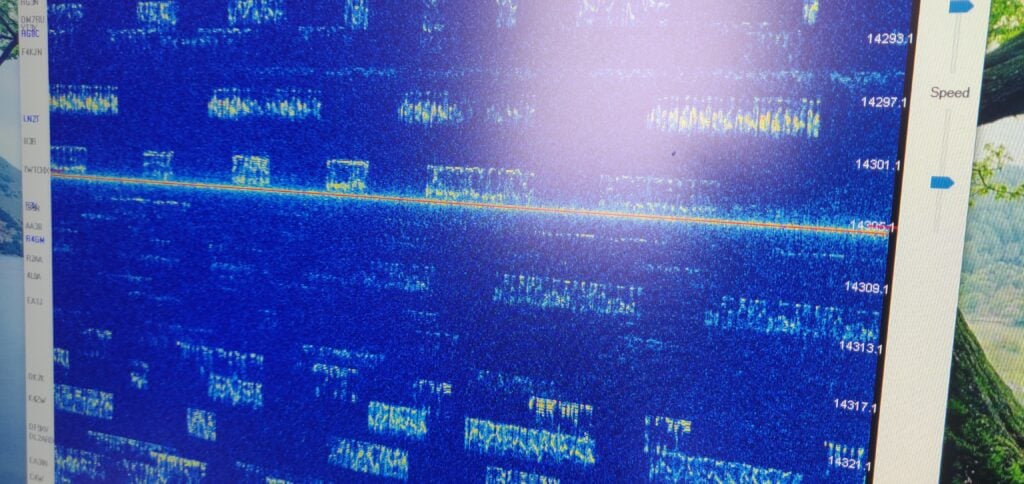
Signals in CQ WW SSB shown in Waterfall Bandmap

Why do you want a panadapter?

First off, something on why you might want panadapters in amateur radio and why they are useful especially in busy contests. Panadapters are typically bits of hardware that connect to a radio and give a visual indication of the spectrum beyond just the bit you can hear. Elecraft sell the very nice P3 as the official hardware add-on to the K3, but it has always felt to me rather overpriced for what it is.

Panadapters are particularly useful in busy contests because they allow you to see what you can hear on the band. You can use this to:

  • identify possible gaps where you might find a CQ (‘run’) frequency
  • see which multiplier stations (scoring the most points) are strong with you, so you can focus on working them quickly
  • find out where splatter is coming from

One thing that the P3 can’t do, and which is becoming increasingly popular with software panadapters, is to use DX Cluster spots to overlay callsigns on the signals you can see, making finding multipliers to work even easier. With this set up, Waterfall Bandmap even colour-codes the spots so you can quickly distinguish which signals you have already worked and which are multipliers.

The equipment I used

I soon realised that I had all the kit required to set up a panadapter quickly, but the instructions for using this specific combination were spread around the internet and also needed some guesswork – hence this post. Other sources will be more useful to you if you aren’t using this exact combination.

  • Elecraft K3 with KXV3 board (which gives IF out on a BNC connector)
  • FunCube Dongle Pro+ SDR receiver
  • DXLog.NET contest logging software
  • Waterfall Bandmap

Instructions

Connecting it together

  1. Connect a BNC-SMA lead from the K3 IF out to the FunCube
  2. Connect the FunCube over USB to the laptop
  3. Connect an RS232-USB lead from the K3’s RS232 port to the laptop and then use Device Manager in Windows to identify the COM port that will be used for the rig control

Set DXLog.NET to communicate with Waterfall Bandmap

  1. Start DXLog.NET and ensure rig control is working
    There are plenty of instructions online for doing this, but it’s outside the scope of this post.
  2. On the Options menu, choose Broadcast and then select both Radio information and Receive Broadcasts
  3. On the Options menu, choose DX Cluster and then select Send spots to SmartSDR
  4. On the Options menu, select Configure network

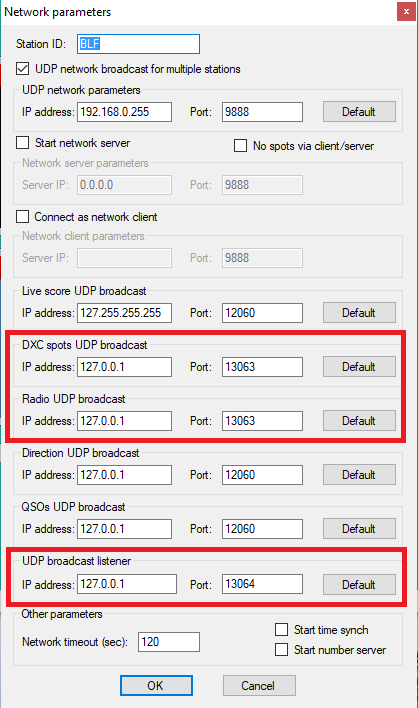
You now need to set three specific settings. In each case below, I’ve assumed that Waterfall Bandmap will run on the same computer as DXLog.NET. If that isn’t the case (which may be especially true in a multi-radio environment) you’ll need to replace 127.0.0.1 with the IP address of the computer running Waterfall Bandmap.

  • Set DXC spots UDP broadcast to IP address 127.0.0.1 and port 13063
  • Set Radio UDP broadcast to IP address 127.0.0.1 and port 13063
  • Set UDP broadcast listener to IP address 127.0.0.1 and port 13064
  • Then click OK
Settings in DXLog.NET

Finally, on the Options menu, ensure Enable network is checked.

Prepare Waterfall Bandmap to use the FunCube Dongle Pro+

Go to the FunCube Dongle Pro+ downloads page and get copies of two things:

  1. The latest FCD+ Frequency Control Program
  2. The EXTIO file

Copy these into the folder where you have unzipped the Waterfall Bandmap program.

(You may already have copies of these for working with other programs on your computer. If so, you can just put a copy of the EXTIO file in the Waterfall Bandmap folder.)

Putting it all together

  1. Start Waterfall Bandmap
  2. Allow the program if prompted by Windows SmartScreen, and also allow it to communicate on Private Networks if prompted by Windows Firewall.
  3. You’ll see an error message saying ‘SDR program not fully supported!‘
    That’s OK – these instructions work around this error.
  4. Check that ExtIO_FcdProPlus.dll is selected in the middle dropdown menu
  5. Check SDR at IF?
  6. Set the IF frequency to 8213kHz (although this doesn’t actually matter, as Waterfall Bandmap can’t actually do frequency control itself)
  7. Set the Sample Rate to 192000 sample/sec
  8. Set the Input to [MME] Line (FUNCube Dongle V2.0)
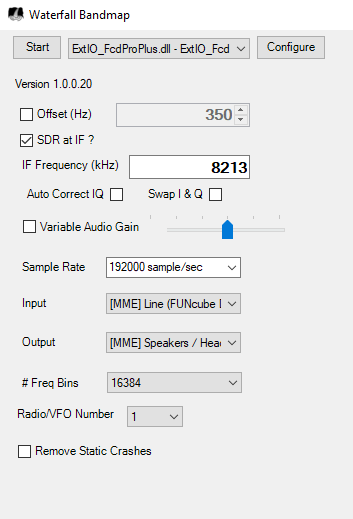
Waterfall Bandmap settings

As I say, Waterfall Bandmap can’t actually control the frequency of the FunCube Dongle Pro+, which is why we got the error message at the start, and why the frequency we set above didn’t actually matter. To resolve this:

  1. Start the FCD+ Frequency Control Program
  2. Set the frequency to the K3’s IF frequency, 8213kHz and click Set frequency
  3. I found I also had to increase the IF gain to around 15 to see decent results on the waterfall; your settings and contrast preferences may vary.
  4. Back in Waterfall Bandmap, click Start
  5. Set the Zoom, Contrast and Speed to your preference
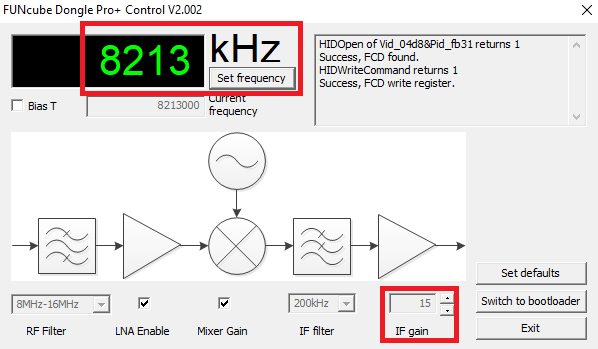
FUNcube Dongle Pro+ Control settings

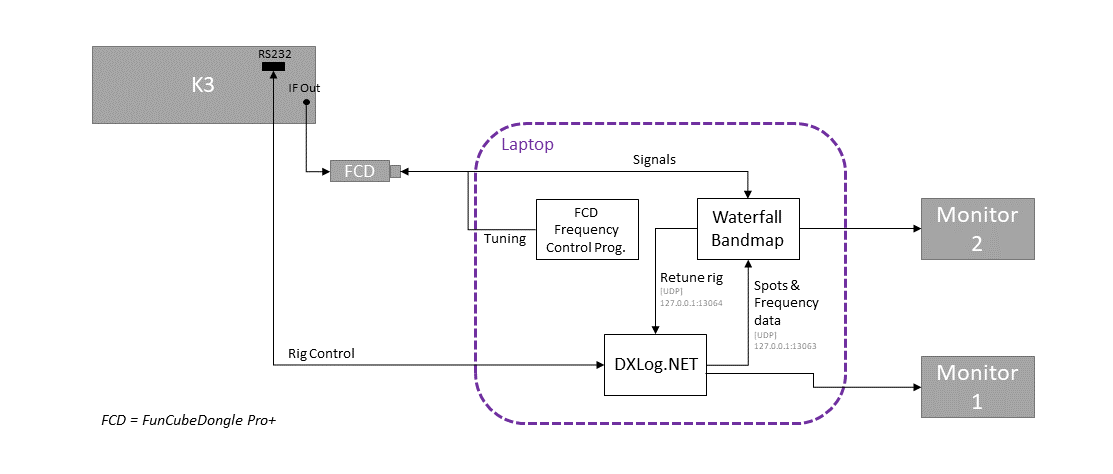
The setup should now look like this:

Block diagram showing the setup (Click to enlarge)

You should now be seeing signals displayed on the waterfall, and DX Cluster spots will appear to the left of the spectrum display.

Fine tuning

Having done this, I found that the receive frequency shown in Waterfall Bandmap was slightly incorrect, which would have meant that clicking on a signal wouldn’t have tuned the rig correctly if this was left.

Using another rig set to minimal power, I generated a constant CW tone and then set the Offset value in the Waterfall Bandmap settings until the signal was correct. In my case, the correction value I needed was 350Hz.

Conclusion

It’s not too difficult to set up Waterfall Bandmap, a FunCube Dongle Pro+ and the K3 to give a useful bandmap alongside the DXLog.NET software, but it does take a bit of configuration.

I certainly found it very useful during CQ WW SSB, although the one annoyance was that the bandmap doesn’t expire cluster spots, meaning you have to click Clear all spots periodically to tidy up the display.
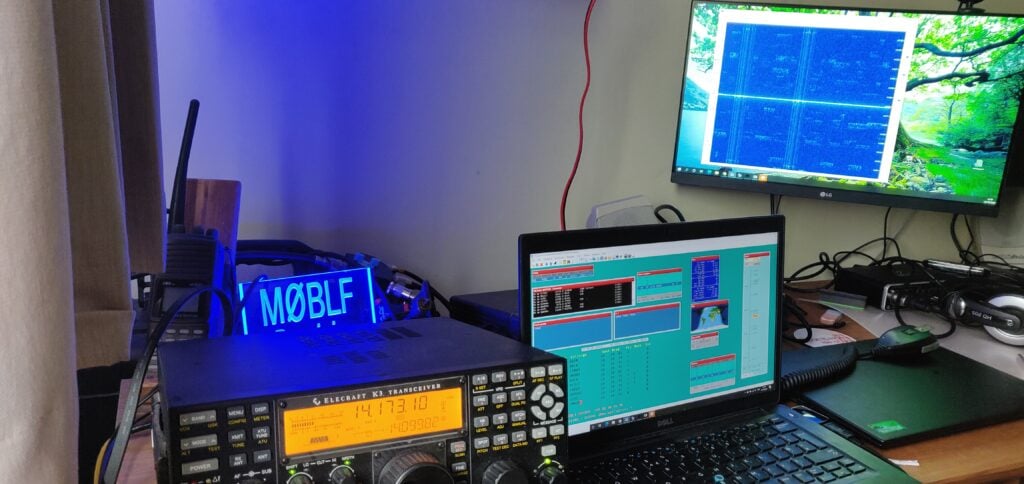
CQ WW SSB 2020

For the last 15 years I have almost always operated CQWW SSB from M4A in the multi-single or multi-two categories. It’s one of the highlights of my year. However, with the current coronavirus situation limiting our ability to meet up, I found myself limited to a single operator entry this year.

I decided to go for the SOSB(A) on 20m category, both since I can fit a 20m dipole into my garden and also the fact that 20m is closed overnight, thereby allowing me the chance of at least a bit of sleep! And (controversial opinion follows…) of course I went for the assisted category, because I don’t see why you’d want to make life hard for yourself by denying the existence of the DX Cluster!

Running just 100W into a dipole hastily constructed the day before the contest, I set myself a modest target of 200 QSOs for the weekend. That wouldn’t be enough to win anything but I could at least feel that I had made a meaningful contribution.

Equipment

  • Elecraft K3
  • 20m dipole at about 7m AGL
  • DXLog.NET for logging
  • Waterfall Bandmap, fed from a FunCube Dongle Pro+, taking the K3’s IF feed, for panadapter (My set up instructions)

The entry

I was actually very surprised! Although it was certainly hard going with relatively low power, I had made my target of 200 QSOs by Saturday late afternoon. This was entirely search-and-pounce, and I spent a lot of time chasing multipliers. That said, by the end of the day, I was still missing entities and zones that should have been fairly easy, like Asiatic Russia.

I didn’t expect to get very many more QSOs on the Sunday as I suspected I had worked all the easy ones, but to my surprise there were plenty of Europeans still to work. I quickly decided to adopt a strategy of trying to get as much of a rate as I could S&P, so that I could optimise my score after focusing on DX the day before. This strategy paid off, and by the afternoon I even found a clear frequency where I could try running. I could only hold a frequency for about 15 minutes at a time, but it was enough for a few countries I might otherwise not have got (such as 9H and GI) to call me.

I was somewhat surprised how late after sunset the band stayed open on Sunday evening (I didn’t declare the band dead until 21:30 UTC) and this allowed me to get several more US stations and even to get my best DX of the contest, PX2A. Thanks to all the stations who struggled to pull my weak signal out.

As for the dipole’s performance, I was very impressed. Although I didn’t manage to work them, I heard VK3, YB and 9G, so it certainly worked well. I didn’t manage to hear any JAs, even though I was aware from the cluster of a good opening to them on Sunday morning. I suspect this was because I’d deliberately orientated the dipole to fire to the North-West and South-East to optimise paths into Europe and the US. As you’d expect for my low power setup, 82.2% of my QSOs were in Europe, with Italy and Germany the main countries.

Results

Contest : CQ World Wide
Callsign : M0BLF
Mode : SSB
Category : Single operator
Overlay : ---
Band(s) : 20
Class : Low
Grid square : JO02BG
Operating time : 29h 10m

 BAND QSO  Z  C DUP POINTS  AVG
-------------------------------
  160   0  0  0   0      0 0.00
   80   0  0  0   0      0 0.00
   40   0  0  0   0      0 0.00
   20 493 14 62   2    667 1.35
   15   0  0  0   0      0 0.00
   10   0  0  0   0      0 0.00
-------------------------------
TOTAL 493 14 62   2    667 1.35
===============================
      FINAL SCORE: 50 692

Operators : M0BLF
Soapbox :
Created by * DXLog.net version 2.5.0 by 9A5K *
http://www.dxlog.net

RSGB Webinar on QO-100

My ‘lockdown project’ for during the recent coronavirus lockdown was to finally get myself on the QO-100 satellite. It was one of those projects I had bought various bits for but never had the time to assemble and sort them out.

On Monday 27th July, I gave a talk about this as part of the RSGB’s ‘Tonight @8’ webinar series. It was quite a challenge as I battled an unseasonably blustery evening in my garden, but I think we got the idea across!

Most of my setup was strongly inspired by M1GEO’s post on the same setup

Correction

During the Q&A at the end, I mentioned hearing an M7 licencee on the satellite recently, and also said that QO-100 could be a good starting point for someone new to the hobby.

It has been pointed out to me that the 2.4GHz (13cm) uplink frequency is not permitted for Foundation licencees, and so they aren’t able to use the satellite.

Equipment used:

The component parts of my setup included:

  • Lime SDR-mini
  • 90cm Satellite dish
    (I recommend getting this style of arm so the PotY antenna has sufficient clearance)
  • PotY antenna kit (designed by G0MJW, PA3FYM and M0EYT)
  • Domestic PLL-locked LNB
    (These are supposed to be as good as the well-regarded Octogon LNBs but I find mine can drift a bit)
  • Heatsink (designed for the Raspberry Pi) and 12V fan for the SDR
  • 12V – 5V regulator and heatsink for the driver boards
  • Bias-T
  • LNA amplifier driver boards (SPF5189Z)
  • Wifi amp
  • Project box
  • Decent coax from Wifi Antennas
    You’ll need as short a length as possible RP-SMA Male (Wifi amp end) to SMA Male (PotY end). I got CLF-200 cable as anything thicker may not clear the PotY clamping arrangement.
    On the RX side, you’ll also need some standard satellite TV coax terminated in ‘F’ connectors. This doesn’t have to be so good quality.
  • USB3 A/B lead to go from the LimeSDR to your laptop
  • PotY ring reducer and LNB cover
    Download 3D printer files for these – You can also now purchase the reducer as an option with the PotY.

You’ll also need a copy of SDR-Console. Thanks to Simon G4ELI for this work on this.

As I mentioned several times during the talk, my approach is not the only way to get on QO-100. It is one of the cheaper routes, but it is a little more QRP than other users.

More information

Keeping Cambridge 105 Radio running

aka: How Cambridge 105 Radio’s technical team has responded to the challenge of our studios being closed by the coronavirus pandemic

The current coronavirus crisis brings a particular challenge for broadcasters. It’s at times like these that both the information, and the company, that we can provide become all the more important. This has been borne out in the notable increase in radio listening that’s been reported nationally and especially locally in recent weeks.

However, we’re still people, and although journalists and those who support them are classsed as ‘key workers’, we can’t justify keeping a shared studio space open, particularly when it’s difficult to clean technical equipment like mixing desks appropriately.

As a small community radio station with very little budget, we can’t just send presenters home with equipment that has been pre-tested and known to work, so we’ve had to get more creative. This post takes you behind-the-scenes at some of the stuff going on and I should stress it’s been a team effort from all of my colleagues in the Engineering team to keep the station on the air. This is far from just my work!

The four types of broadcast

Generally Cambridge 105 Radio operates a schedule that focuses on popular music and ‘generalist’ programming by day, moving to specialist programmes at evenings and weekends. As a general rule, many of the daytime shows are live (and have to be, as they report on current affairs and things like travel news), while we can operate pre-recorded programming for a lot of the specialist shows.

Within that split, some of our presenters have their own home studios already, while others have much less equipment, and perhaps just a laptop and microphone. We quickly identified, therefore, that there are four scenarios we needed to deal with:

  • Live from a home studio
  • Live without much equipment
  • Recorded from a home studio
  • Recorded without much equipment

The home studio scenarios

For the people with home studios (or those able to put some together at short notice), they were the easiest do deal with. Fortunately, we have a long history of doing outside broadcasts, meaning many of our computer systems are exposed outside the studio local network, and we had the option of using an IP-based feed into the studio for live programming. So, for these people we mainly had to ensure they had access to the systems they would need, issue passwords and ensure they had up-to-date copies of imaging, etc.

How do you broadcast without much equipment?

Pre-recorded programmes

For pre-recorded programmes, limited equipment hasn’t proved to be a major issue for many of our presenters, though we have needed to lend some assistance in a few areas. Our general approach is to recommend using the best microphone presenters have available with Audacity or Reaper. Non-linear editing techniques allow the spoken links to be fitted between tracks fairly efficiently, and if there’s only one presenter, this can give an acceptable result providing it is normalised. We’ve had to give a few people who wouldn’t normally pre-record their programmes access to the station’s upload system to submit the finished file, but that’s about it for programmes with a single presenter.

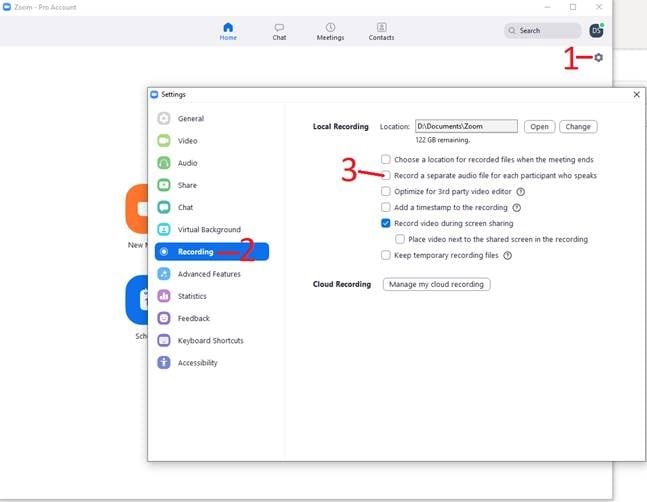
Where more than one presenter is involved producing a pre-recorded programme, we’ve generally been recommending Zoom to record conversations. Hidden away in the settings, even on the Free tier, is a handy option to create a different audio file for each person in the conference, which makes editing a lot easier – in particular with regards to ensuring levels are consistent.

Zoom’s handy option to record a different file for each participant makes editing easier

The big challenge came with live programmes from presenters with limited equipment…

Live programmes

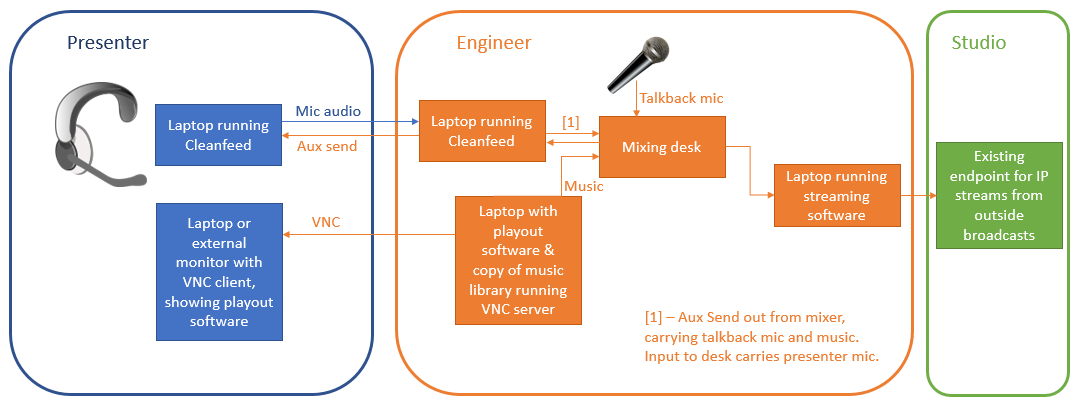
So how can you run a live programme when the presenter is isolating at home with just a laptop and microphone? The solution we came up with is shown diagrammatically below. A couple of us engineers set up temporary home studios, which can be used by the presenter remotely:

Architecture diagram
Architecture diagram of the solution (Click to see enlarged version)

At the presenter’s end, there’s just a laptop with headset and a VNC client.

At the engineer’s hub, there is:

  • A laptop running Cleanfeed. (This is a web-based peer-to-peer voice solution.) The presenter connects to Cleanfeed from their laptop running Chrome. The incoming audio from the presenter is routed to a mixing desk.
  • A laptop running the music playout software, Rivendell, also running a VNC server, which the presenter takes control of during their programme. The copy of Rivendell has a copy of the main studio database and music library. Music played by Rivendell is sent to another input channel on the mixing desk.
  • The engineer has a microphone for talkback to the presenter, which is only routed to the mixer’s aux send.
  • On the mixing desk itself, the input from the presenter and the music are routed to main out. The talkback microphone and the music being played are also routed to aux send. That aux send is then sent back to Cleanfeed. This enables the presenter to hear the music being played, and also to talk to the engineer if necessary during tracks (the engineer can PFL the presenter’s feed from Cleanfeed to allow this, without affecting the broadcast).
  • The main out from the mixer is sent to another laptop running either Opus Transmitter or Butt. (We prefer the Opus codec over MP3 for its low-latency qualities.) Butt now includes Opus by default in its latest version, but we’ve found that it can be unstable, so we tend to use Opus Transmitter – the older port of Butt with Opus support).
  • Butt or Opus Transmitter are connected to the existing endpoint in the studio for outside broadcasts over IP.

Since the presenters have no fader control in this scenario, just the mute button in Cleanfeed, we’ve also had to produce pre-dipped versions of beds (the music used in the background of weather and travel bulletins, for example), which they can just talk over.

The only real issue we’ve found is that the presenter ends up juggling quite a lot on a potentially small laptop screen:

  • emails / texts coming into the studio (presented as a secured webpage)
  • travel news and other scripts
  • the VNC client
  • Cleanfeed in a web-browser tab, which they need to remember not to close

(Top tip: Use the ‘Time offset’ setting for the Rivendell host to account for the delay back to the studio – in our case about 3500ms. That way the presenter sees the delay already built-in on the clock over the VNC connection, and doesn’t need to do any complex back-timing calculations.)

Other things we’ve been doing

There were just a couple of systems in the studios which weren’t exposed externally, such as the studio clock (used to remind presenters of their clock hours and what’s coming next). We’ve also had to write some code to make it easier to see when IRN (Sky News Radio) is scheduled, as that previously required interpreting a crontab. Finally, we’ve now also got some code to pre-compile advert breaks into a single file, meaning that presenters don’t have to hunt for individual adverts over the VNC connection.

The results

Earlier this week, we managed to provide 14 hours of live programming, coming from six different locations across Cambridge. (This was in addition to a further four hours of pre-recorded programming.) This means we’ve been able to continue providing a valuable public service to our community, which is why we’re here.

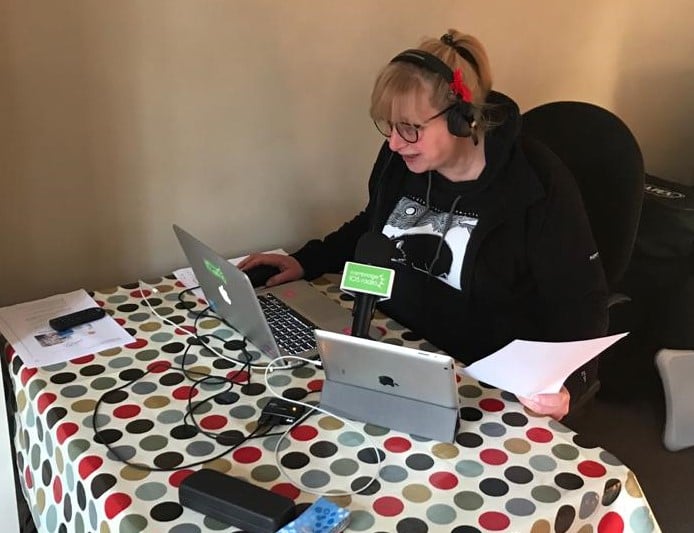
The presenters seem pretty pleased too. Here’s Alex presenting from home…

Alex broadcasting remotely from home

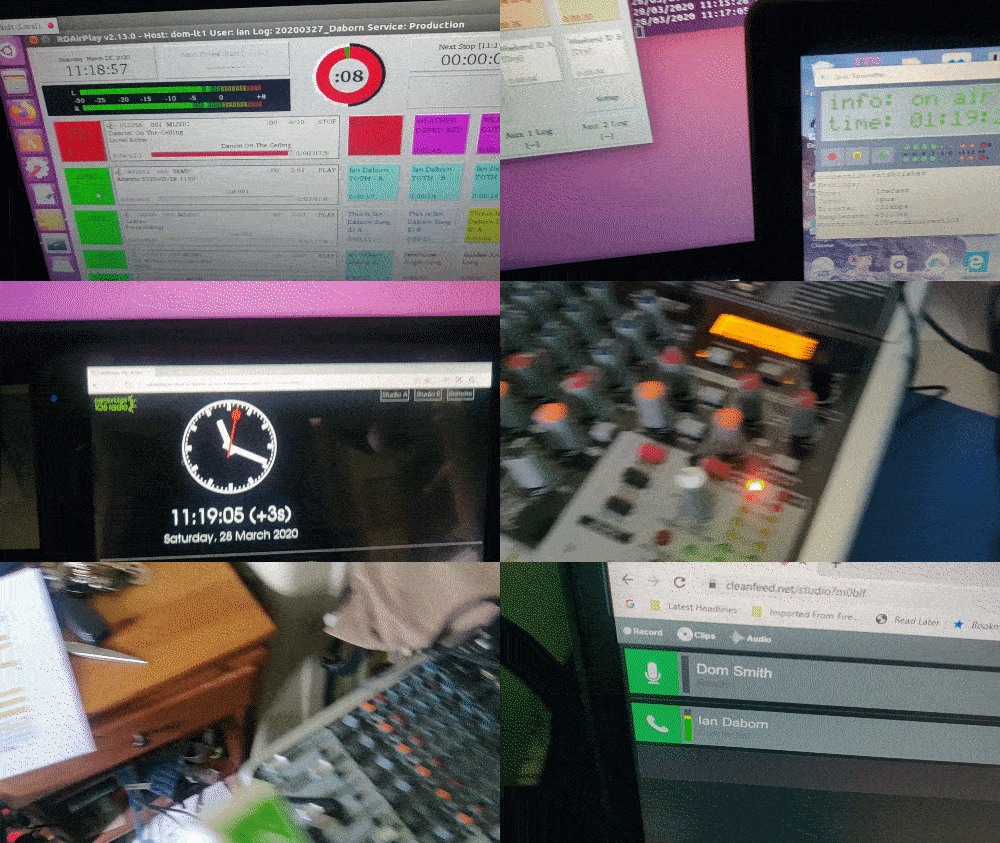
…and here’s my home studio in use by Ian Daborn during his Saturday morning programme earlier today.

My ‘engineering hub’

To turn this around in just a couple of weeks has been a great team effort. The only significant difference listeners will have heard is that some local news bulletins between programmes have been replaced by the national news from IRN, followed by a local news read. This is because we can use the time while IRN is on to take one feed down and bring up a different one.

Updated May 2020: Although some more programmes are now feeding to the studio directly, most of our live daytime output continues to use this system. Last month we added a 5GHz long-range wifi system to my house and that of one of the other engineers, so that we have redundant internet connections. If either of us lose internet, or it becomes unreliable, we can switch the whole system to using the other person’s network.

Two quick SOTA activations in Cyprus

During the ZC4UW DXpedition, Rob M0VFC, Dan M0WUT and I spent a morning doing a couple of local SOTA summits, largely so that I could tick off my fourth continent for the SOTA Explorer awards.

It’s winter and we didn’t want to go too far, so we limited ourselves to two four-point summits, about 10kms north of the ZC4UW QTH in the western Sovereign Base Area.

SOTA has only had an association in the Republic of Cyprus since February 2019, so there are still lots of un-activated hills, but we stuck to two which had been done before, given the weather and time constraints.

5B/CY-029: Τοφούλια

Activating Tophoulia is pretty easy, though the last hundred metres of road leading to the car park needs some care and attention as there are some steep hairpin bends with little protection.

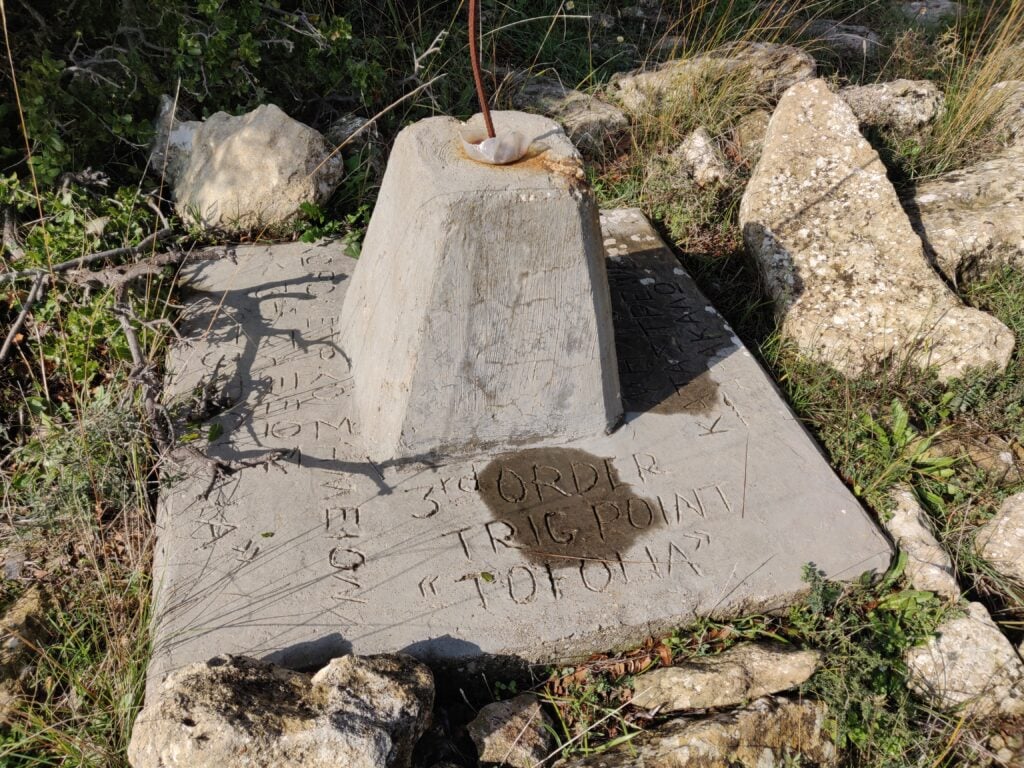
We parked at the Αγία Μαρίνα monastery in Pachna. There was a fair amount of car parking space available. From the car park, it’s simply a matter of spending 10 minutes picking a path up to the summit, where there is a basic trig point.

Trig point for Tophoulia / Tofolia (the alternative spelling is merely a difference in transliteration)
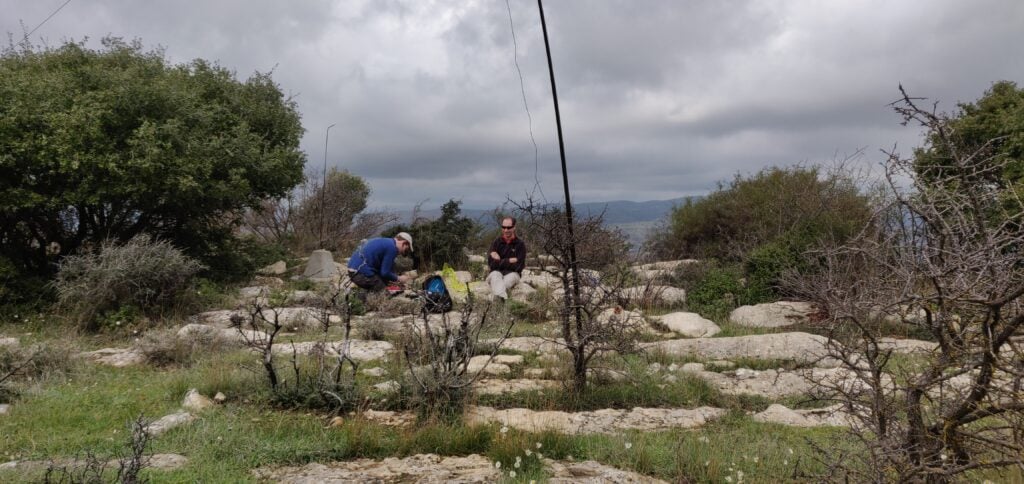
Rob and Dan operating at the trig point
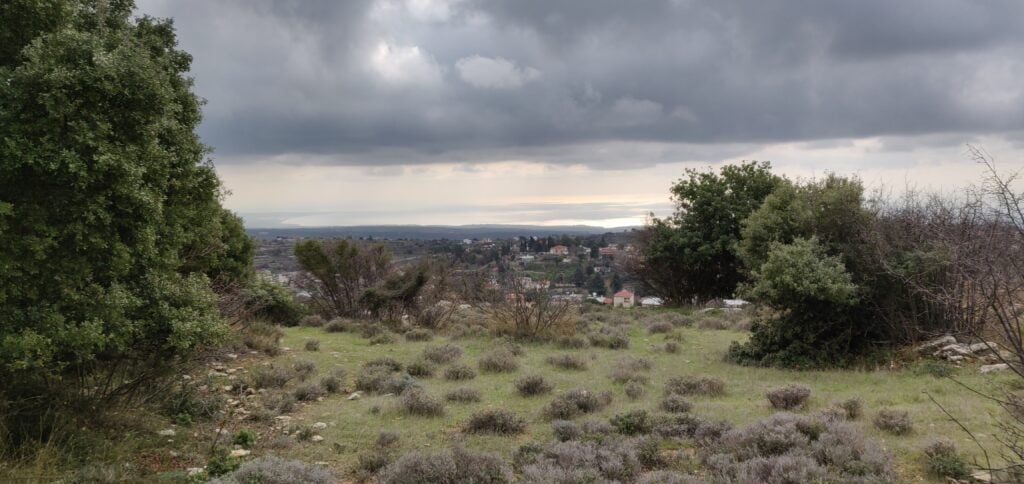
The view south, towards the Akroteri peninsula

5B/CY-031: Βράχος Δορά

The village of Dora is about 25 minutes’ drive from Pachna, along some perfectly passable but narrow streets. Care needs to be taken particularly in Dora village itself, where my SatNav had a tendancy to take us down the smallest alleyways, instead of more major roads.

On the south-western outskirts of Dora, continue to the monastery at 34.7774 N, 32.7374 E, where again we found there was ample parking on this quiet Sunday, the day before Epiphany.

The monastery at the start of the walk

Take the steps to the right of the monastery entrance, which are marked with a walking man symbol. This path leads directly to Rock Dora, the SOTA summit and highest point above the village. Amusingly, the well-kept path has a number of trees labelled with their species.

The climb is very gentle and the wide, earthy, path is clearly defined, so the walk is nice and easy. After about 20 minutes, a sign-post to your right indicates where to leave the path and head to the summit, even though the sign-post itself doesn’t say Rock Dora

Leave the path at the sign-post and follow upwards to the summit
Operating at Rock Dora
The view from the summit

For both of these activations, we made about 20 QSOs between the three of us – sufficient each to qualify – on 20m CW, before heading back to the DXpedition shack to resume working the pileups!

On the economics of DXpedition QSL Cards

Over recent years more than occasional comment has been made by some DXers about whether QSL Managers make money from sending out QSL cards. Obviously, not all DXpeditions have the same policies but a year after the VP2MUW expedition, here’s how our QSL finances stack up.

Important note: I’m writing this in the interests of transparency on the topic following a few very emotive posts and policies from some DXpeditions. This is certainly not an appeal for money, and I don’t propose to suddenly increase the amount I ask for, nor do I wish to dissuade you from asking for a card if you want it!

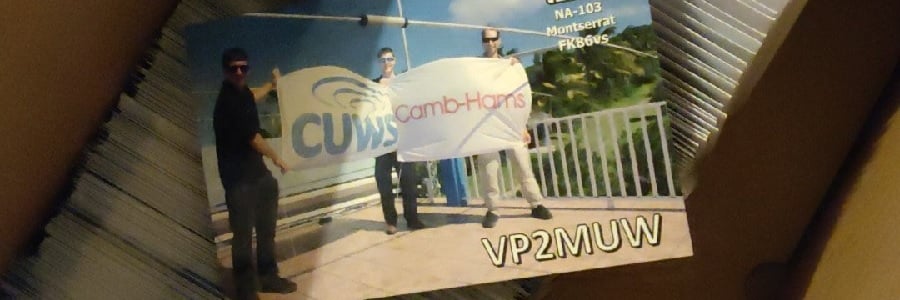
QSL cards for VP2MUW

Most people request direct cards via OQRS. Until April 2019, the cost of an international stamp from the UK was £1.25. It was then increased to £1.35. (These international stamps cover 20g to Europe or 10g to anywhere else, which is sufficient to post a QSL card).

In turn, I asked for £1.80 for direct cards until April 2019, and then £1.90 thereafter. This means I was asking for 45p per card more than the postage price. That 45p needs to cover the card printing, labels for the QSO information and address label, an envelope, and, of course, Paypal fees. (Spoiler alert: it doesn’t) – Oh, and due to a complete failure to account for Paypal fees on my part, I actually only charged £1.60 for cards until January 2019, which includes the bulk of cards ordered immediately after the trip.

I have sent 206 direct VP2MUW QSL cards (ie. 206 different recipients – there is more than one QSO on each card) so far. Here’s how the outgoings stack up for those cards:

Item:Quantity:Each:Total:
Labels412£0.058£23.90
Envelopes206£0.068£14.01
Stamps (UK)36£0.56£20.16
Stamps (International)155£1.25£193.75
Stamps (International)15£1.35£20.25
Card printing206£0.042£8.65
PayPal fees206£0.31£63.86
Total cost to me:£344.58

Note: It’s difficult to extract from Paypal exactly how much you have spent in fees for a given period. The £63.86 shown here is an estimate based on their standard rates, across all the payments I received. It’s almost certainly an underestimate because it doesn’t account for the voluntary donations, which will also have attracted a percentage charge.

By asking for £1.60-£1.90 per card, I received £196.70 in total, meaning that sending direct cards made me a loss of 72p per card. (There will also have been a few ‘green stamps’ and pre-stamped envelopes mailed to me, but I’ve ignored those as I don’t have exact records of these. They are certainly a small number, however, as OQRS is the main way I am asked for direct cards.) Fortunately, we have some very generous people in the hobby, so I received an additional £105.20 in voluntary donations. These donations help offset that loss, reducing it to 21p/card.

However, we haven’t discussed bureau cards yet. I don’t get any money for those. I’ve so far sent 630 cards via the bureau. Luckily, these only need one mailing label each, so:

Item:Quantity:Each:Total:
Labels630£0.058£26.46
Card printing630£0.042£36.54
Total cost to me:£63.00

There’s then the cost of sending the cards to the bureau to consider. This is more difficult for me to judge as each QSL card batch I send contains cards for multiple expeditions but I’d estimate I have spent about £20 on bureau postage for the VP2MUW cards alone during this year.

If we take £83 as the total cost to me of sending bureau cards, the final amounts look like this:

Incoming:Outgoing:
Direct cards£196.70Direct card costs:£344.58
Donations£105.20Bureau card costs:£83.00
Total£301.90Total£427.58
Loss:£125.68
Loss per card:£0.15

For the benefit of an American audience, here’s a conversion to dollars:

Incoming:Outgoing:
Direct cards$253.74Direct card costs$444.50
Donations$135.71Bureau card costs$107.07
Total$389.45Total$551.57
Loss:$162.12
Loss per card:$0.19

SOTA operation in Prague City: Ládví

I’ve recently returned from a few days in Prague doing tourism and sightseeing. While the primary focus of the trip wasn’t radio, I noticed that there’s a SOTA summit on the outskirts of the city, which I had to go to.

OK/ST-084: Ládví

Getting to Ládví requires no car hire at all. If you are in Prague (and you should go – it’s a beautiful city), this summit is accessible via public transport.

The only real instruction is to take the metro to Ládví station on the Prague metro, Line C. If you are in the city for a while, you will probably already know that a ticket covering all metro lines, buses and trams on the fantastically integrated transport network costs just 310 CZH (about £10.50) for three days. This means that there is no additional cost to activate this hill.

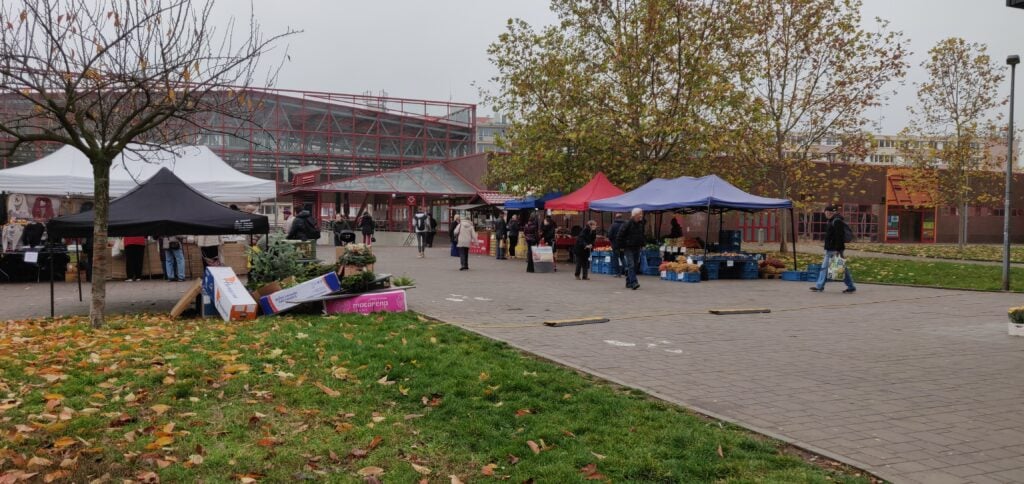
Ládví station is on the northern outskirts of Prague city. You come up out of the underground into a commercial centre with supermarket and also a local street market.

Outside Ládví station

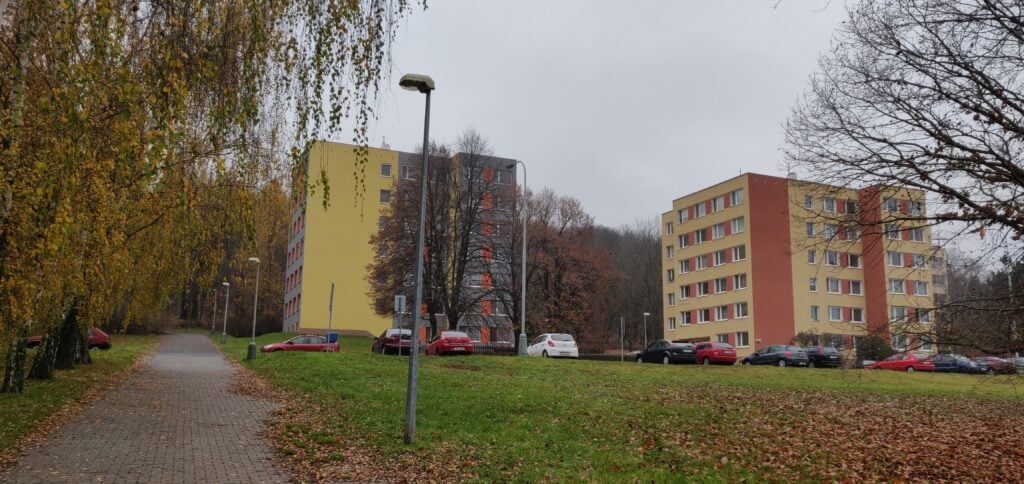
From here, walk along the wide cycle/foot path through the tower blocks – the first tower blocks I’d seen in the trip – over a road, gradually heading up a slight incline. (The road is Žernosecká; it’s not particularly busy and there’s a pedestrian crossing.)

Heading towards the summit

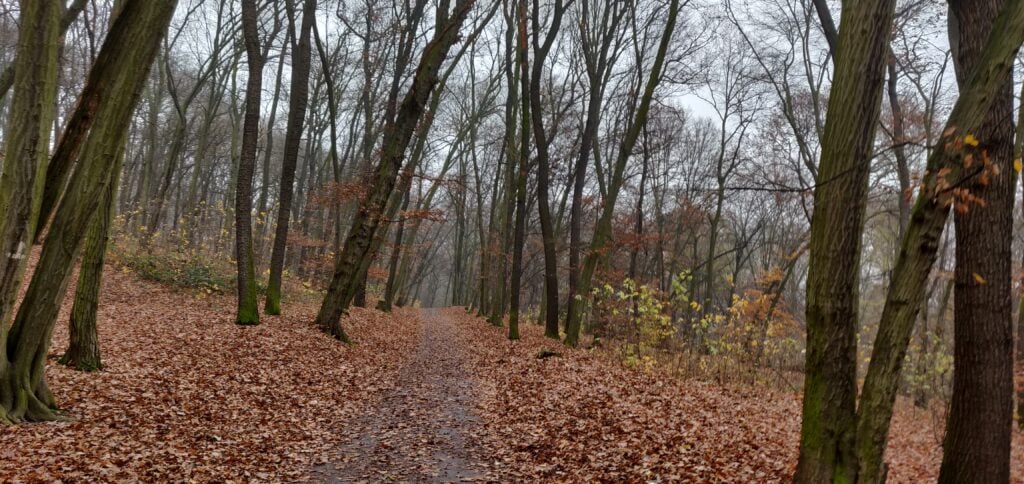
The path soon gives way to a narrow path which splits. You can go up either route, but I headed right, through the trees. Again, this isn’t a particularly steep path, nor was it very slippery despite the damp autumn leaves on the ground. In fact, there’s a layer of tarmac underneath the path but a thin layer of mud had built up in places. Near the top of the ascent, you are inside the activation zone. You can normally turn left to reach the official summit, but on my visit it was taped off due to tree felling.

The path to the summit

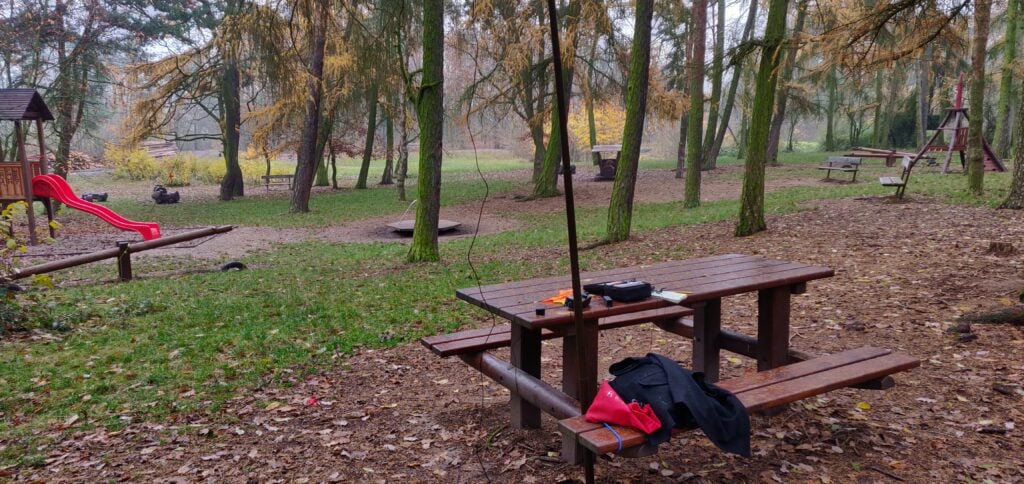
Instead, I headed right to the children’s play area, where there’s a useful bench, about fifteen minutes’ walk from the metro stop. Here, I was able to use bungees to hold up my fibreglass pole and soon had set up the gear.

But something wasn’t right. My antenna didn’t really sound like an antenna. I wasn’t getting spotted by the RBN, even enabling the ATU in my KX2 there were SWR problems, and after too long calling CQ to no avail, I spent more time fault-finding. It eventually transpired that the problem was an easy one: a patch lead had become intermittent. Holding it in exactly the right place solved the issues and this was good enough to get 3 QSOs on 20m and 3 on 30m, enough to get the one point the hill is worth.

Set up at the play-area

This is a lovely little hill to activate and a wonderful way to spend a half-day while in the area.

Loading map…
Distance
—
Elevation gain
—
Elevation loss
—
Max elevation
—
Waypoints
—
Elevation profile

Agile Cambridge 2019: piecing it together

Last week was Agile Cambridge, the annual, three-day, conference on Agile at Churchill College in Cambridge. Despite the fact that my new job role doesn’t directly involve Agile any longer, I was speaking and I wanted to go for all three days anyway, because a lot of the sessions looked interesting.

For the last couple of years, I’ve been thinking of Agile Cambridge as getting a bit samey – the same topics, often by the same speakers – and I wasn’t getting a whole load of value from it. This year was different, however. The conference had a different feel and a fresh approach, which made it very useful once again. I summarised it after the event on Twitter, thus:

End of 3 days at the 10th #agilecam. Main takeaway: Agile is now mainstream. Few talks discussing process, how to release faster, how to get user feedback. Instead, lots of team formation, the need for diverse (inc. neurodiverse) people & safe communication. We’ve come a long way

https://twitter.com/dnas2/status/1180147651448315905

In this post, I wanted to cover some of the sessions that particularly resonated.

Agile Cambridge

It starts from the team

Previous Agile conferences have tended to lump together the team as a single, homogeneous unit. This time, the role of individuals within the team and their diversity was a key topic.

  • Zara Sheldrake from ARM gave a particularly thought-provoking presentation on the subject of Neurodiversity in Agile Teams, talking about some of the ways that Agile is both good for neuro-diverse individuals (the Prime Directive, the role of Scrum Master as a shield, and pairing) and terrible (the enormous PI planning events from SAFe, open plan offices, and the language of sprinting). She discussed some ways that ARM have tried to mitigate some of these factors, both through things like mental health awareness and making the environment better suit the team.
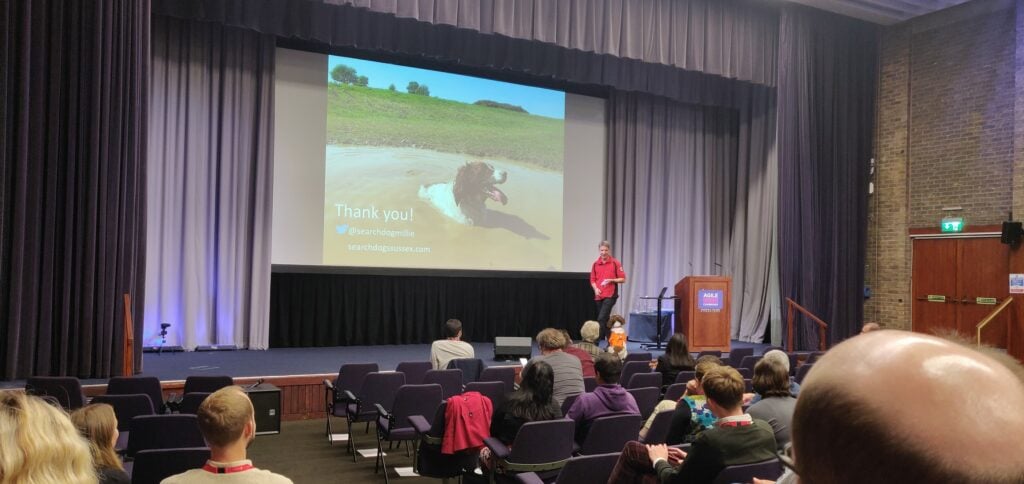
  • Through this work, which includes features like setting team norms and personal user guides, they are trying to create a psychologically safe environment for learning. Two other sessions explored how such safe environments have been adopted in other contexts to ensure lessons are effectively learnt in life-and-death situations. In One Super Dog and her servant leader, Darren Yates from Lowland Rescue talked about how techniques for search and rescue scenarios have evolved over the last 20 years. Similarly, Jeff Foster from Redgate explored Why planes don’t crash, again about how the aviation industry goes to very substantial lengths to ensure they fully understand root causes for any incidents, so that flying is made safer. It really made some of our retrospectives seem quite superficial.

It’s always communication…

  • Of course, all of this ultimately comes down to the most difficult problem in software development: communication. Nick Maidment, now at ARM, previously Metail, explored some of the challenges Metail had faced and overcome as they moved from a mainly onsite team to a mainly remote one. As you might expect, neither extreme proved particularly problematic, but The Space Inbetween, where only a couple people are remote, is where the difficulties lie.
  • One of the few talks to directly relate communication to processes was Your bugs aren’t special by Emily Tate. The challenge is the perennial one that ‘little things’ often get done on the sides of the prioritised work. In one case cited, the ‘little things’ were taking up to 30% of the iteration time. The thing I found most interesting was framing this as a communication breakdown, that different stakeholders aren’t adequately talking about their competing priorities.
  • Related to both the psychological safety and communication themes, Redgate’s Chris Smith ran a workshop on Crucial Conversations. He explored some of the theory from The Chimp Paradox to explain how we can help get our ‘chimp brains’ under control at work, and how to accept it when we, or other team members, have chimp responses.

How to get change

  • One of the bases of what Chris was talking about is that you can only change yourself, not others. You’re much more likely to be successful by opening your own mind than trying to convince other people of your opinion. This was also a message that came across in Linda Rising’s second keynote of the conference on Moral Foundation Theory. Her argument was that we should aim to listen people into agreeing with us, and we can do that by examining issues from the opposing moral standpoint. For liberals, we tend to argue about care and fairness, while conservatives tend to focus on loyalty, authority and sanctity, so listen for their arguments from their moral foundations. Linda’s other key message in this talk was that correcting people with data tends to lead to them holding their view more firmly. This is because we’re evolved to take quick decisions and justify them later. It’s much more effective if we tell stories around our ideas like a press secretary, rather than as a judge spurting facts.
  • The different points of view in a team, and the challenges arising from them, was also the topic of Linda Rising’s first keynote of the conference, Who do you trust? Beware of your brain. She used the example of the Robbers Cave Experiment to show how we are keen to divide ourselves into them/us tribes, even when there is no difference between the groups, and how the tribes were only unified when there was a significant, real-life problem, to solve through joint teamwork. This is a lesson that software team leaders can learn from.
  • Selena Delesie’s keynote The Soul of Agile, picked up on some of these points. Her fundamental message was that we get the best from our teams at the intersection of three things: An open mind (curiosity, to have power with an individual, not over them), an open heart (compassion, focusing on the individual) and an open will (reducing fear and increasing courage in the team by being willing to release the need to control individuals and releasing the need to have future plans). Notice the focus on the individual here – you may need to take different approaches for different people.

Diversity in background

  • If all of the above focus on individuals seems hard, it’s worth it because of what different skill sets bring to the team. In the keynote The Death of the Liberal Arts, Ashley Hunsberger argued that there is a need for liberal arts students in development teams, because understanding what to analyse, the context of data , writing (communication) and giving feedback are all transferable skills that are gained in essay writing in literary criticism. The ability to juxtapose having a big picture view while also focusing on details is (literally) a feature of art criticism. So why do we often insist on Computer Science degrees in our job advertisements? The other thing that liberal arts students can bring is the consideration of ethics. The need for ethical programming is becoming increasingly visible with the likes of Cambridge Analytica news stories, and so asking ‘How can what I’m building be used to hurt somebody?’ is a useful thing to consider.
  • The other regard in which we might want to consider ethics more is asking ‘How does your product end?’. In the final keynote of the conference, Ends – The lost narrative of consumerism, Joe Macleod promoted thinking of the off-boarding journey for your product as much as you think about the on-boarding journey. Considering what happens to a product at the end of life, whether it’s software and there’s a hard user experience to let go, or hardware that needs recycling in an easy way, off-boarding can make business sense in increasing loyalty. (Incidentally, in our field of academic publishing, the whole industry has mechanisms to ensure content lives on after a publisher has ceased to exist.)

So what am I taking back to work?

First off, I haven’t covered a couple of the useful sessions in this post so far, because they didn’t quite fit the narrative flow. Given my recent change in job title, however, I found Stefan Tilkov’s session on Agile Architecture and Innovation particularly useful, and I’m certainly talking to my colleagues about his ideas. I especially liked his proposed Architecture Manifesto on the basis of the Agile Manifesto as a way of explaining what we are trying to do:

– Conscious trade-offs over emerging architecture
– Documented rationale over quick ad-hoc decisions
– Sustained changeability over easy initial development
– Design for replacement over design for re-use
– Simplicity over fast delivery

Stefan Tilkov

Beyond this, the other things I want to do include:

  • Considering the needs of individuals more than thinking of Agile as a one-size-fits-all thing that the team agree and compromise on. I may well promote Zara’s talk a bit within the company.
  • Trying to change the P1 process we have at work for retrospectives so they are more deep and get to better root causes. Of course we aren’t the airline industry, but thinking about some of their detailed analyses is something we could do to improve.
  • I’m going to read The Chimp Paradox so I can look out for ‘chimp responses’ in individuals and account for them better.
  • Think more about working with remote colleagues as we are in that ‘space inbetween’ of having just a handful of remote workers.

Basque Country SOTAs: Xoldoko Gaina

Xoldoko Gaina F/PO-245 (1 point)

After the frustration of the Pic de Guilhers yesterday, I left my hotel in St. Jean de Luz early, with the aim of climbing Xoldoko Gaina (aka Choldocogagna) before heading to Bilbao for my return flight back to the UK.

The path for this one starts in the village of Biriatou, just on the French side of the border by the A63 motorway. By the way, there are lots of toll booths on the motorway around the border area, so be prepared to have to pay several times if you are leaving the motorway – it’s only a couple of euros each time, though.

In the village, you can park in the car park behind the church and walk up the hill to pick up the road heading east from the village. At the fork at 43.3327, -1.7397 bear right and the tarmac gives way to a path leading up through woodland and then into open countryside.

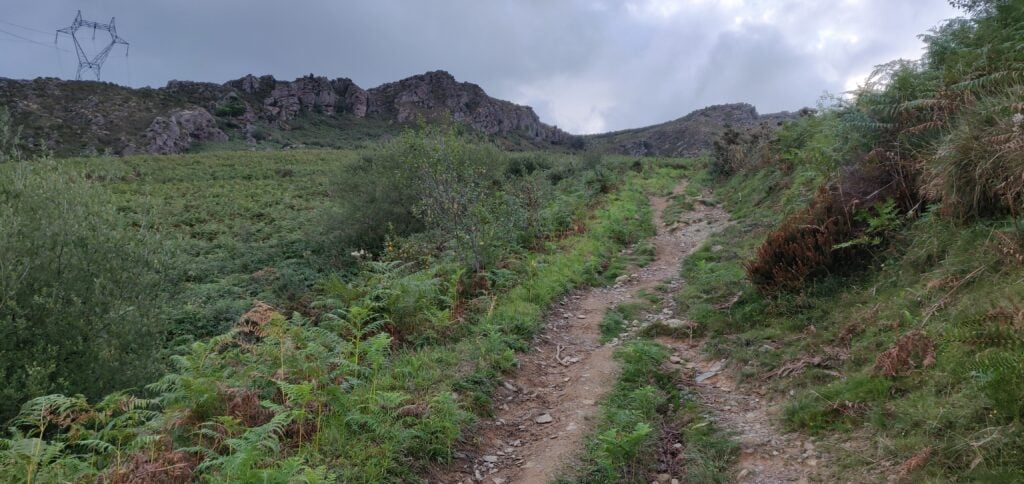
The path up Xoldoko Gaina

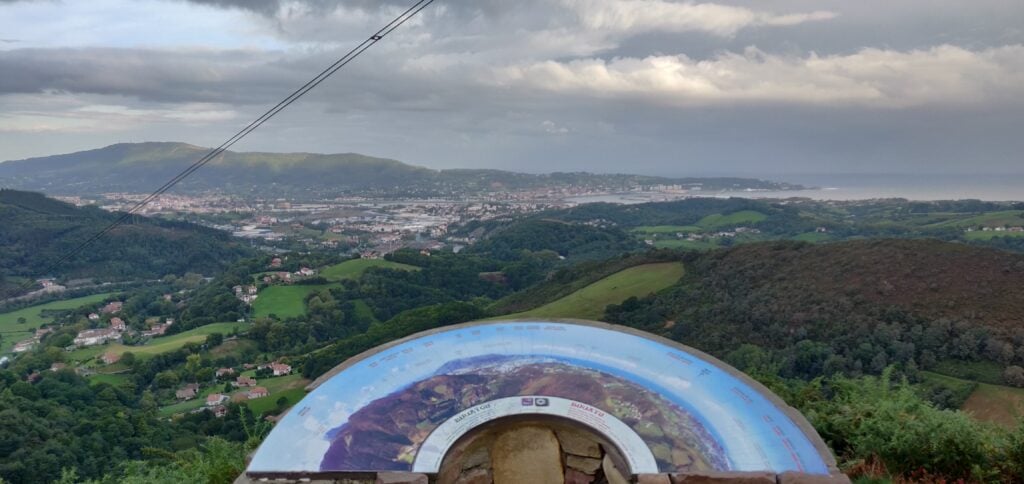
The obvious path leads you up onto the ridge – it isn’t a difficult ascent – roughly following the high voltage electricity line that crosses the river (which at this point forms the French/Spanish border) in the valley below. Once you are up on the ridge, there’s a fantastic view Hendaye/Irún (in practice the same town but Hendaye is in France on the north side of the river and Irún is on the Spanish side) and out over the Bay of Biscay and up the Landes coast.

The view from the ridge

From here, it’s only a little further uphill to the summit, which has a nice flat area for setting up an antenna.

It was still fairly early in the morning as I’d parked in Biriatou at 08:30 local time, and reached the summit about 55 minutes later. From the top I made seven contacts before packing up and descending the 45 minutes back to the car. The walk has a 290m ascent over about 2.9km.

Leaving Biriatou, I made a quick stop for fuel in Irún (where diesel for my hire car was cheaper than in France), before heading to the airport.

Loading map…
Distance
—
Elevation gain
—
Elevation loss
—
Max elevation
—
Waypoints
—
Elevation profile

Basque Country SOTAs: Pic d’Issarbe and Pic de Guilhers

Pic d’Issarbe F/PO-171 (4 points)

I’d done the Pic d’Issarbe on my last trip to the Pyrenees, and it’s a lovely, easy four-point walk at this time of year. The site is a minor ski resort in the winter and as such has a car park which was almost deserted on this September morning.

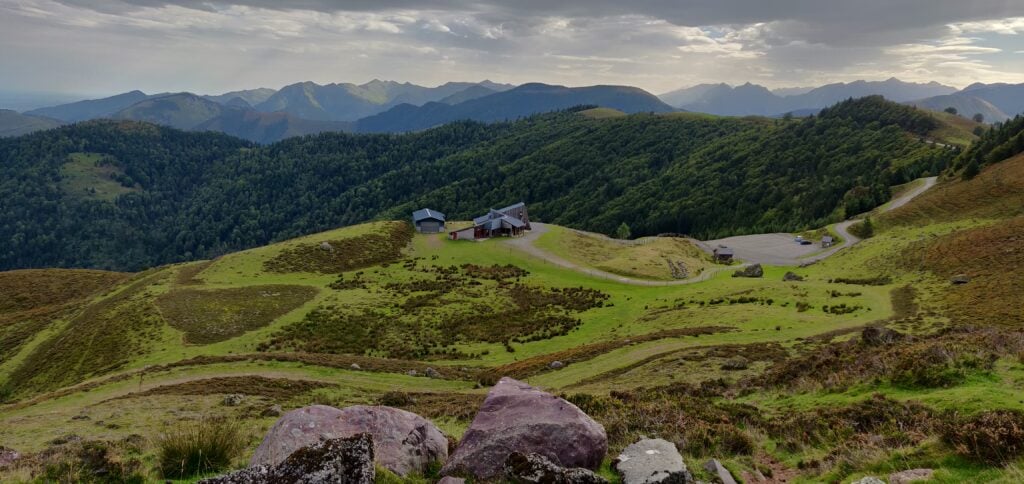
The car park at Pic d’Issarbe seen from the ascent

The ascent up the hill is simply a matter of choosing one of the many ski-run paths and following it to the top. The summit itself is marked by a small metal cross and there’s a reasonable amount of space within the activation zone for an HF dipole, even though the terrain slopes away quite quickly. It was a very pleasant morning and I was slightly ahead of my schedule, so I made 28 QSOs on 30m CW before descending.

The ascent took me 25 minutes for a climb of about 160m vertically over only just over a kilometre horizontally on the wide, grassy, paths. The descent took a little less.

Loading map…
Distance
—
Elevation gain
—
Elevation loss
—
Max elevation
—
Waypoints
—
Elevation profile

Pic de Guilhers F/PO-283 (4 points)

For the Pic de Guilhers, I opted to follow EA2EEB’s track from the SOTA Mapping website, which starts from the car park at the Pierre St Martin ski resort. This was not the best idea but more on that later.

Under usual circumstances, the car park is only about 20 minutes’ drive from the Pic d’Issarbe, which is why I’d opted to do both mountains on the same day. However, I hadn’t allowed for meeting a large flock of sheep which surrounded my car and I spent several minutes inching forwards trying to follow the road without herding them.

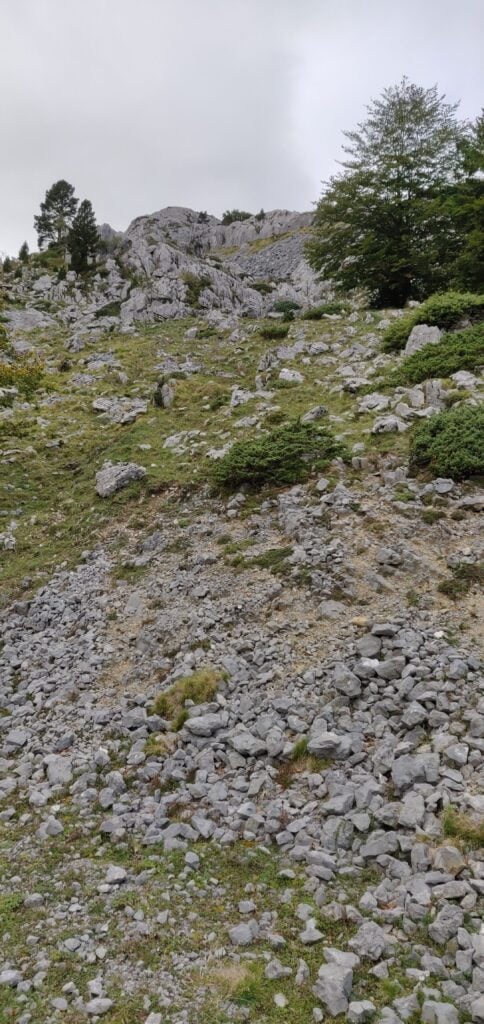
The other reason that the Pierre St Martin car park is not ideal is that it means you start the climb from higher than the summit. The walk starts with a steep descent down a rocky gully at the side of the road to reach the valley floor, before you have to ascend the hill itself. A preferable option would have been to start from the car park at 42.9849,-0.7429, which would have saved a chunk of the walk.

The walk starts by descending a steep path from the road to Pierre St. Martin

Once at the bottom of the gully, you follow a couple of ski runs to join the main D132 for about a kilometre before leaving the road again. This is some pretty boring walking on tarmac, still heading downhill, but you soon get your first proper sight of the Pic de Guilhers and the challenge it represents.

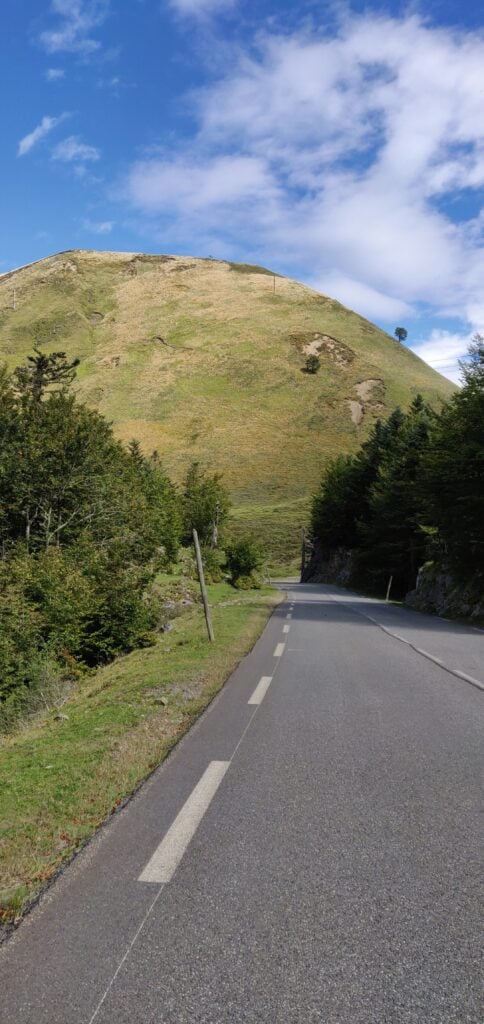
The Pic de Guilhers from the road

As you can see, the mountain is a steep ‘pudding bowl’ with apparently no path up it. As you get closer, you see that there are many paths that actually skirt around the bottom of the hill – some may be animal tracks others caused by erosion – and intuitively I initially tried to pick my way up to the highest of these to gain some high and then go up from there, again following EB2EEB’s GPS track. I found it just too step, however, and fearful of sliding down the hill I decided to continue around the side of the mountain. It looked like there might be a slight shoulder behind the hill.

The many tracks at the bottom of the hill
If you try to climb up from the bottom, the hill quickly becomes very steep

My map reading was right. I’d recommend that you actually follow one of the middle paths around the side of the mountain without worrying too much about gaining height at first. Once you have skirted around the side, aim for 42.9931, -0.7330 and then follow the narrow path to where the trees meet the side of the mountain at 42.9948, -0.7326. From here, it’s a relatively easy ascent through the heather to the summit.

Once you are at the top, it’s fairly flat, and there’s plenty of room to set up a wire antenna. Sadly, conditions weren’t great, so I only made 10 QSOs from here on 30m CW before packing up.

As you might have gathered, this is a bit of a beast of a hill for just four points. Not only did I park higher than the summit and have to walk downhill to start the ascent, but I lost a lot of time trying to pick the right path on the ascent and tryign to gain height prematurely, only to have to carefully pick my way along steep, narrow paths. Consequently, the climb took me 1 hour 20 minutes to walk 3.85km horizontally, and ending up 30m lower than the car park where I had started, but still 160m above the valley floor below. The descent took only ten minutes less, and was exhausting with the final climb back up the gully to the car park. With that, I headed the 2h30m to my hotel in St Jean de Luz, from which I’d go up Xoldoko Gaina tomorrow.

Loading map…
Distance
—
Elevation gain
—
Elevation loss
—
Max elevation
—
Waypoints
—
Elevation profile