DXpedition Announcement: Svalbard, July 2015

From 10th-17th July 2015, I will be one of six operators activating the JW5E shack on Svalbard.

We’ll be operating on 40m-10m (and maybe some 6m if conditions allow), mainly on SSB and CW, using JW/{homecall}.

We won’t arrive in Longyearbyen until late in the evening of Friday 10th, and we depart very early in the morning on Friday 17th, so in practice we’ll be QRV for about six days.

Please remember that Svalbard has midnight sun for about four months, so it won’t get dark while we’re there. That means that we’re expecting 40m and 15m+ to be very difficult.

QSL will be via Clublog OQRS (please don’t send paper cards). We will be swapping operator at times, so please ensure you log the correct home call – don’t rely on an old spot from the cluster.

For more information, see my main DXpedition page at http://www.domsmith.co.uk/amateur-radio/dxpeditions/2015/jw

The full operator list is:

  • Myself
  • Martin G3ZAY
  • Hugo M0HSW
  • Tom M0TJH
  • Rob M0VFC
  • Gavin M1BXF

How to send a text message to the 1970s

As some of you may know, I’ve been involved in Cambridge 105’s ‘Pirate Cambridge 105’ special event – a 12-hour live broadcast from a riverboat moored on the River Cam, intended to celebrate and reminisce about the golden era of Pirate Radio.

In keeping with the theme, we limited ourselves to only using equipment from the 1960s and 1970s. For mixing desks and audio processing, that’s an easy deal as long as you can get hold of the gear. (It’s amazing what people have hidden in the back of their garage.) But this left a crucial question: How do we get text messages and emails using only 1970s gear?

The easy option would have been to say that we don’t take listener input during the day. But we’d already started making arrangements to broadcast on the Channel 292 frequency, 6070kHz shortwave. This meant that we’d potentially have many more listeners across Europe, so hearing from them would be great.

One bit of technology that did exist in that era, of course, is radio teletype (RTTY).

What’s RTTY?

For those who aren’t familiar with RTTY, essentially you have two audio tones which represent 0 and 1 respectively. Encoding characters in the 5-bit Baudot code, you can set up a radio transmitter to rapidly switch which audio tone it is sending, which lets you transmit characters.

By modern standards, RTTY is incredibly slow: about 50 baud (50 bits per second, or 10 characters per second), but it works.

Originally, the receiving end would have been a teleprinter, which was essentially identical to a mechanical typewriter, but connected to a radio driving it.

So how did we do it?

Well, we didn’t have a genuine teleprinter available, and besides it would have been too noisy next to a radio microphone even if we did. Instead, we got a couple Raspberry Pis (running Fldigi, which allows you to transmit and receive RTTY in software).

At the transmit end, a script on the Pi grabbed incoming texts, tweets and text messages to the studio and sent them to a radio every 2 minutes. Messages were truncated at 200 characters (to avoid using all the receipt roll at the other end!) and word wraps had to be inserted every 40 characters, which is the width of the receipt printer font we were using.

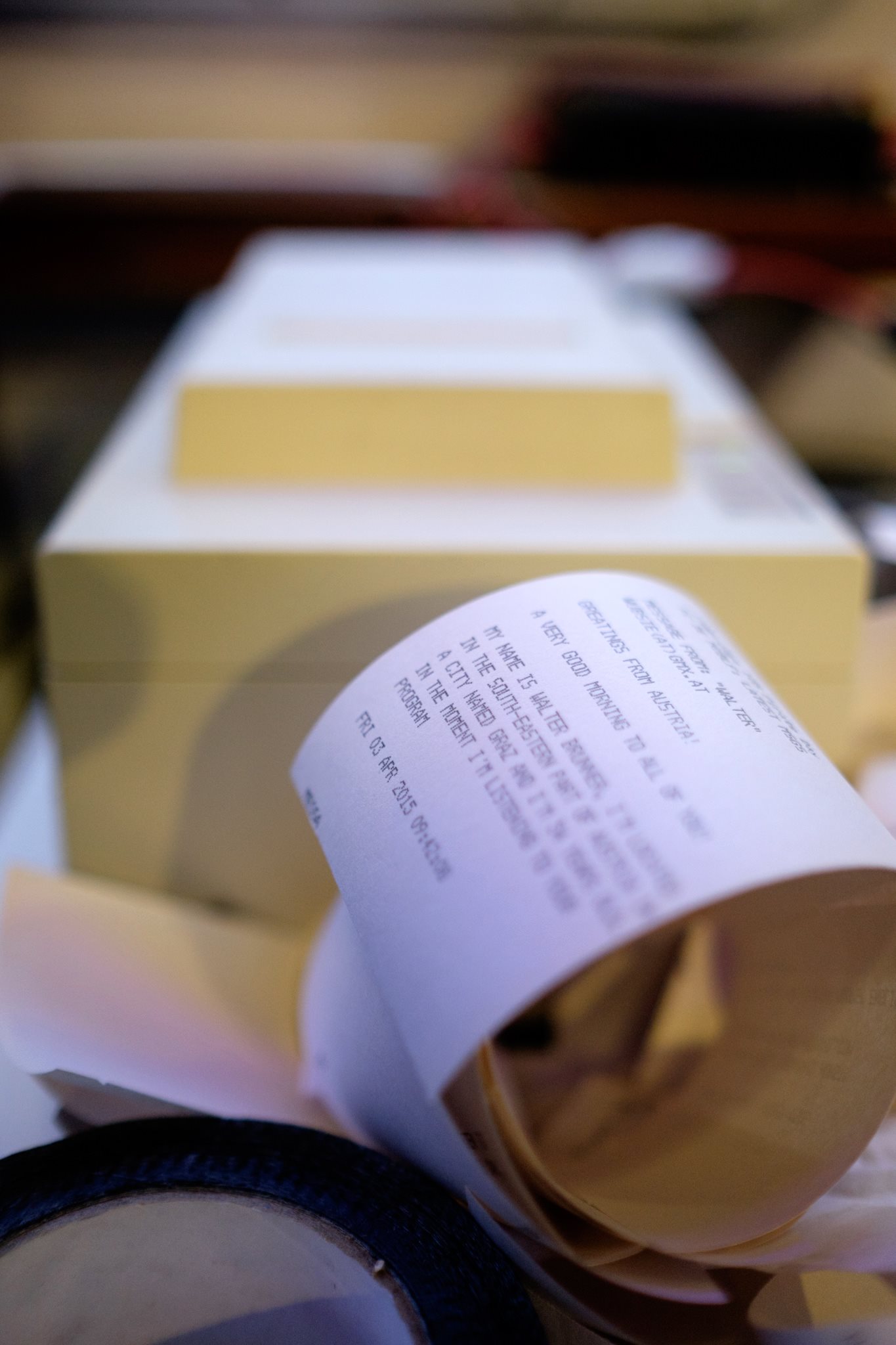
At the receive end, the other Pi did the decoding – yes, we broke the 1970’s equipment rule, but the technology was still of the era – and sent the result every minute to a dot matrix receipt printer.

Messages that were OK to read on-air could then be given to the presenter by hand, on tiny pieces of receipt roll.

Any improvements?

I don’t know whether we’ll ever have cause to use this system again but, if we do, we need to detect the end of messages rather than just doing the print every minute. We hadn’t expected the volume of messages we received (we used most of roll despite the truncation!) and this meant a significant number of messages got cut as they were printed mid-transmission.

Pirate Receipt Roll
Photo by Jonathan Watts

What is technical debt?

This article is my own synthesis of ideas presented at Lean Agile Scotland in September 2014 by Dan North, Jabe Bloom and Torbjörn Gyllebring, with some of my own embellishments. Any misunderstanding of their points is mine! I’ve linked to their original talks at the foot of this post.

Conway’s Law says that the design of our system will be rooted in the design of our organisation.

So, we can never design a system from scratch: some of the design will have already started before we start designing.

This isn’t necessarily a problem, however: indeed, we should embrace it, because organisations suck if they don’t have the right APIs and other architectural borders in place between where teams are (that’s when teams start to get bureaucratic layers preventing their work from proceeding as their pace.) We should take time to get this right, and this is why having micro-services to do communication between teams is a good idea.

However much we work on this, however, we will face problems in the code we write, many of which will relate to the architecture. We can either chose to fix the symptom (via a quick fix) or to fix the underlying problem (which is generally more time-consuming). Quick fixes aren’t necessarily bad when applied in conjunction with a longer-term fix but remember they are akin to painkillers, and you can’t take painkillers indefinitely.

Quick fixes often take the form of a mandated structure: we might add too much or too little process, a particular build system, an architectural design ‘recommendation’, a decision on a particular source control system or IDE, or similar. As managers, we should be especially careful with such quick fixes. We are aiming to apply a ‘Goldilocks’ amount of constraint on our teams: too constrained and development will stop because the people can’t do their job; too little constraint and there will be too many options to do the right thing. The right amount is a strategy that’s clear enough to give us a task for today and a constrained set of options for the future. That strategy is actually a conversation – top-down constraints from management, and bottom-up information and designs from the development teams.

Partly because of the difficulty of identifying the ‘Goldilocks amount’ without information from the team (which presupposes time taken to do investigation), quick fixes generally tend to exhibit more unintended consequences than fixes that correct the underlying problem.

In a Cynefin sense, rather than taking time to analyse a problem as demanded by Complicated scenarios, our quick fix has made matters worse by creating a Complex relationship. The side effects can’t be foreseen, but become apparent in retrospect. Worse still, the quick fix may fail to address the root cause of the problem, and so we may get a positive feedback loop causing problems to increase as a result of our solutions.

This is technical debt, because the system starts constraining what we can do.

Cynefin tells us we should monitor for this positive feedback and, when we sense it, take time to respond to it, possibly by rolling back the change and trying a different approach.

To check for technical debt, therefore, we should periodically take time to ensure that our system isn’t constraining us. We can do this, for example, by ensuring our tools haven’t become our masters by checking that we can still build our products using a single command line (without complex CI systems) and that refactoring can be done in Notepad (without Resharper).

Original videos:

Understanding a feature through 3-amigos

The last project I ran here at Red Gate was on SQL Compare / Data Compare 11 project. SQL Compare is a superficially simple product designed, as it’s name suggests, to compare Microsoft SQL database schemas. Its cousin, SQL Data Compare compares the data in the tables.

Like the product itself, the Compare 11 project had a superficially simple goal: add support for the new features in SQL Server 2014. Easy, right? It turns out, not so much…

The largest new feature is Memory-Optimized Tables (MOTs): the ability to keep data in memory so you get significant performance improvements through reduced disk-access. But as you dig into what MOTs can and can’t do, you realise that you’ll need a lot of special-cases in the code to deal with the limitations. The details of those limitations is well outside the scope of this post, but one of my colleagues Michelle Taylor has written a useful post on our company blog for those who want to know more.

When the team came to start work on this story, which was before the release of SQL Server, some of the limitations weren’t immediately apparent. This led me (as project manager) to a false sense of security, and so I was far too lax on getting the user stories and acceptance criteria defined in detail. The lack of knowledge this created in the team caused the feature to become massively under-estimated: just 50 task-points (at their velocity, each task-point turned out to be just over an hour of real work).

The first tasks related to this story went on the Scrum board early in the project: ‘Add property to CreateOrAlterTable’, ‘Add property to DatabaseObjectsTable’, ‘Update DatabaseObjectsTable.Equals()’. You see what’s missing? We had dived straight into implementation with no form of planning first. That first sprint was estimated as 15 points. By the time we got to the end of it, we had uncovered quite how unexpectedly complex this feature was likely to become. We were nowhere near 30% (15 out of 50 points) complete on the feature. We carried some of the tasks forward to the following Sprint, however, trying to convince ourselves that we’d crack it soon. Before I knew it, we’d spent nearly a month on this feature, continually uncovering more and more complexity, and morale on the team was starting to become impacted.

Even then, my monthly project A3 report excessively optimistically promised that we’re complete both Inline Indexes (another 2014 feature) and Memory-Optimised Tables in the next four weeks.

It was time to pull the Andon cord.

Luckily, this also coincided with a slight change to business focus. The team was being asked to ship SQL Compare 10.7, giving support for connecting to SQL Server 2014 (but not the new features) to ship with the final release of SQL Server 2014.

Whilst this was a massive disruption to the team, it did give us some breathing space to find out more about MOTs before we had to work on them again.

By the time we were ready to start work on MOTs again, the Product Owner had defined the Acceptance Criteria in more detail. There were a series of tasks, themselves totalling 42 task-points in estimates, which centred on reviewing these ACs and making sure they made sense. This worked OK, and put us in a much better place, but with a large team, the meetings didn’t really work.

At this point, one of my colleagues pointed me to the idea of a 3-amigos meeting. I’d actually tried this once before on a different project, and I found myself wondering why I hadn’t tried this earlier on the MOTs work. The idea is to have three people (specifically the Product Owner, a Developer, and a Tester) in a room together, defining how the feature should work for users, in the code, and in test cases respectively. There’s a good write up of the meeting on the Scrum Alliance website; the only difference for us being that the Product Owner also doubled in the BA role for us. Although it felt slightly more waterfall than we were used to, the output from the meeting was a set of really well defined, clear Acceptance Criteria and a good common understanding of what MOTs involved, that was ready for sharing across the team.

The team re-estimated the work, and came up with an estimate of 250 points. In the end, it took 337 – still rather more than 250, but also far more than the original 50 points planned!

This process worked so well that we adopted the same meeting for other features in SQL Server 2014, rotating the role of the amigos through the dev team. As long as the communication about what was discussed is good immediately after the meeting, everyone became brought into the idea of 3-amigos, and ensured that the chaotic start to MOTs wasn’t repeated during the rest of the project.
Response to the RSGB Contest Committee’s whitepaper – May 2014

On 26th May 2014, the RSGB Contest Committee announced a Whitepaper containing proposals and suggestions for various rule changes. [Whitepaper]

I really welcome this development. It’s great to see the Contest Committee so engaged and keen to hear feedback, and also I like having a clear timetable for the decision-making process based on this feedback.

It was subsequently suggested on the uk-vhf-contesting reflector that it would be interesting to discuss some of the options, and for that reason I’m publishing my response below.

My feedback on Rule Change Proposal Whitepaper

Cambridge Band Competition finals: Behind-the-scenes at Cambridge 105

As many of you will be aware, one of my many volunteer roles is as an Outside Broadcast Engineer at Cambridge 105, Cambridge’s Community FM radio station.

There are essentially two types of Outside Broadcast music events that we run: those where we do the live music mix, and those where we just take an existing feed and add to it. One of the latter sort of event was our live broadcast from the Cambridge Band Competition at The Junction on 29th March 2014. This is the behind-the-scenes engineer’s view.

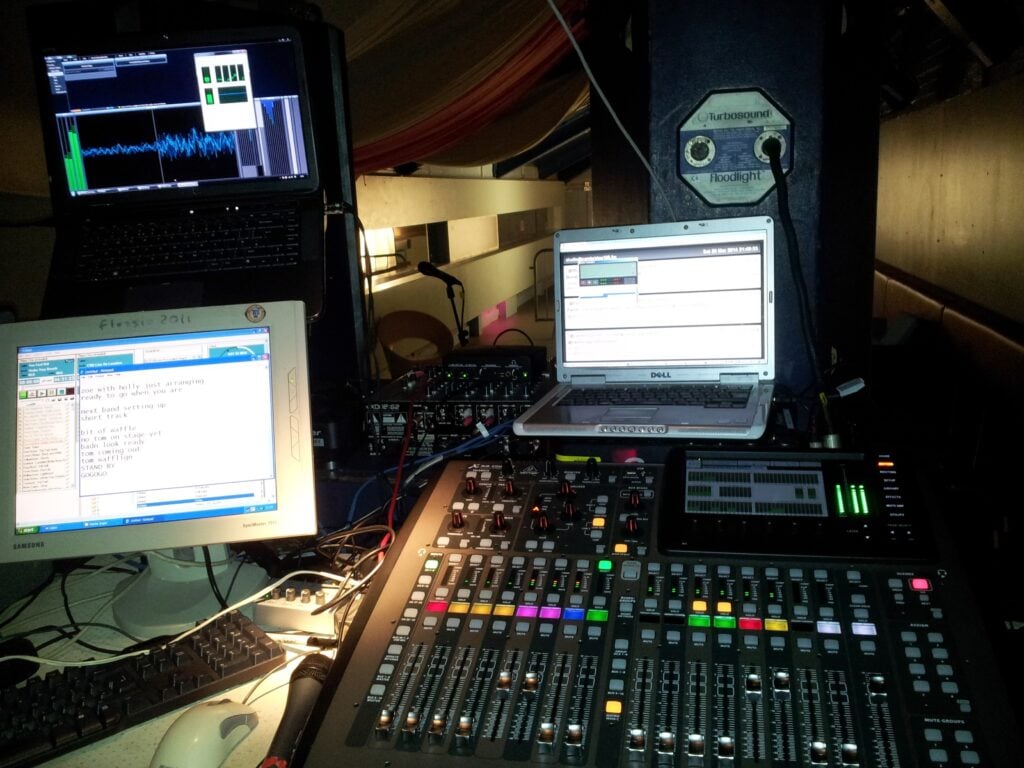
So, what’s going on here?

  • The mixing desk (a Behringer X32 Compact) is receiving a feed from the Front-of-House (FoH) mix, provided by the venue. This stereo pair is the set of faders that are up on the left-hand bank.
  • For some events, we have our own additional mics to get guitar amps (which won’t be fed much/at all to the FoH) and an audience mic so we get the applause at the end. This comes to our mixing desk via a separate feed. (At The Junction, we had the luxury of a set of tie-line from the stage to the room we used for our mix. Normally, we use a Behringer Digital Snake S16 over Ethernet)
  • The Cambridge 105 presenter needs to be able to play pre-recorded music between sets. We use Caban for this, which is on the main left-hand monitor. The presenter(s) have their mics on separate channels on the mixing desk, of course, and the PC takes up another channel.
  • So far, so easy. But the presenter can’t see the stage, and so won’t know when to stop talking, or when to keep waffling. This is a good thing, because a broadcast mix is often sufficiently different from the FoH that we want to mix in an isolated environment. To solve the lack of visibility, however, one of the engineering team (most commonly yours truly) stands next to the stage with a radio mic and set of wireless headphones, and I relay what’s going on. My wireless headphones are supplied with a mix of this talkback and what’s going to air.
  • We also often have a reporter interviewing the acts as they come off stage. That reporter has another pair of wireless headphones (also fed with the talkback + broadcast feed) and another radio mic.
  • The presenter’s headphones are just fed with the off-air feed, not the talkback to avoid distractions. The mixing desk operator can type important messages to the presenter in a Notepad window on the same monitor as Caban.
  • The output from the mixing desk is fed to the laptop in the top-left, which is running Stereo Tool for broadcast compression. We sometimes also use Reaper to record the multi-track output from the desk. Typically, the compressor adds just under a one second delay.
  • From there, the output of that laptop goes into the laptop on the top-right, which is running Butt, to IP stream the broadcast to the Cambridge 105 studio. The IP stream adds another couple of seconds’ delay.
  • The laptop on the top-right also displays the studio email, where we get listener input, as well as automatic notifications if the stream should fail.
  • At the studio, a computer feeds this to the analogue mixing desk in Studio A, where the feed magically appears on a single stereo fader marked ‘Remote’.

My WordPress Blog